.png?width=180&height=32&name=NW%20Logo%20(2).png)
Issue
The attached FNEtool script is able to identify and provide resolution steps for a wide range of most common license issues.The script has to be executed from the Security Analytics / NetWitness server head, auto-detects the NetWitness version currently in use and shows a different menu with possible resolution paths by selecting the appropriate option.
Please Note Option 4 collects logs and all the Info such as serial numbers and config files useful to RSA Customer Support to have a full picture about the current license state of the environment.
FNEtool supports versions 10.3, 10.4, 10.5 and 10.6.
Further reference/details are also available on RSA Link here: https://community.rsa.com/docs/DOC-64719
Tasks
Copy the script to the /root SA/Netwitness head server directory and run the commands below:
chmod +x fnetool.sh
./fnetool.sh
./fnetool.sh
Resolution
After its execution, the script immediately shows the Server ID detected, checks connectivity with RSA download center and restart the fneserver performing a license refresh.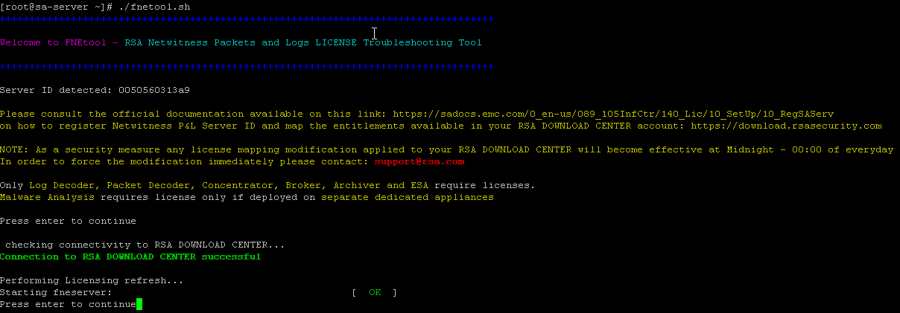
After confirmation FNEtool auto detects the Netwitness version in use and shows a menu based on the version detected where the user can insert an option number.
Options showed for 10.3/4 menu:
- Reset Core and Archiver License Services.
- Reset ESA and Malware Analysis license Services.
- Reset FNE license Server.
- Change Server ID/Mac Address.
- Collect logs for RSA Support.
- Persistent problems uploading manual license BIN file in the.
Ideal troubleshooting approach in 10.3/4 in case of a service still unlicensed after refreshing licenses or uploading capability response BIN file:
- Re-entitle the service from Services section-->Licenses
- Reset service and restart service
- Administration-->System-->Licensing-->refresh, reset fneserver (save config)
- Refresh license or upload BIN file
- Re-entitle service, restart jetty as last resort

Options showed for 10.5/6 menu:
(All the license information are now stored on mongoDB database only, no longer service related reset/actions are required)
0) Detect/Remove Entitlements from the Database (Service based license)
1) Change Server ID/Mac Address
2) Problems with the Red Banner in the UI (Meter License)
3) Print Entitlements collection and license Info
4) Collect logs for RSA Support
5) Persistent problems uploading manual license BIN file in the UI
Option 0 applies to Service based license environments only. It detects if any object ID deletion from mongo is required and if so auto-generates a command that User can copy/paste on the SA/Netwitness head server command line to easily remove the entries from the database in order "to make room" to the new license
For any problem related with Meter License - Red banner option 2 provides further info about those issues and how to approach them.

Product Details
RSA Product Set: NetWitness Logs & PacketsRSA Product/Service Type: Head Unit / Server
RSA Version/Condition: 10.3.x, 10.4.x, 10.5.x, 10.6.x
Platform: CentOS
Platform (Other): Flexera
O/S Version: EL6
Summary
FNEtool script is able to identify and provide resolution steps for a wide range of most common license issues. The script has to be executed from the SA/Netwitness server head, auto-detects the Netwitness version currently in use and shows different menu with possible resolution paths by selecting the appropriate option.
Approval Reviewer Queue
Technical approval queue