.png?width=180&height=32&name=NW%20Logo%20(2).png)
Issue
The Virtual Log Collector or Window Legacy Collector is failing to send events to the Local Log Collector.The /var/log/messages file in the Virtual Log Collector shows an error similar to the following:
Feb 26 17:48:38 vlc nw[3957]: [BufferedChannel] [failure] An error occurred publishing to an AMQP channel:
NO_ROUTE, exchange: sdee, routing key: sdee
The error above indicates that the Virtual Log Collector is receiving SDEE events but is unable to send these events to the Local Log Collector.
Health and Wellness alarm shows " LogCollector Event Processor Exchange Bindings Status" as below for missing collection methods.

Cause
This issue is caused if:- There is no destination set for the Virtual Log Collector or a specific collection is missing from the destination.
- There is no source set for the Local Log Collector or a specific collection is missing from the source.
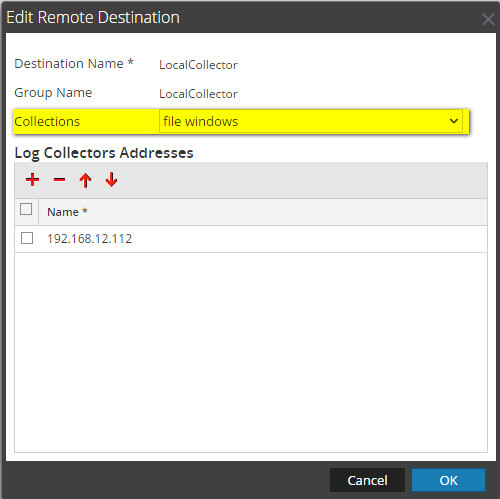
In this example, only File and Windows collections are configured.
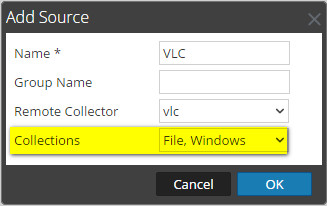
The same issue may occur if the Local Log Collector is configured to pull logs from the Virtual Log collector as shown below:
Resolution
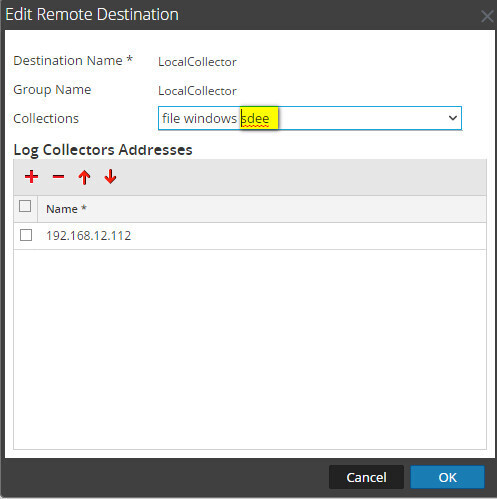
If the Virtual Log Collector is pushing logs to the Local Log Collector:- In the RSA NetWitness Platform UI, navigate to Administration > Services
- Select the Virtual Log Collector service and click on the View > Config button.
- Select the Local Collectors tab.
- Make sure a destination collector is present, if not add it and also add the collections that you would like (sdee in this specific example):
If the Local Log Collector is pulling logs from the Virtual Log Collector:
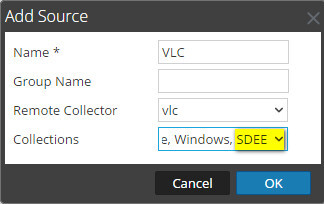
- In the RSA NetWitness Platform UI, navigate to Administration > Services.
- Select the Local Log Collector service and click on the View > Config button.
- Select the Remote Collectors tab.
- Make sure a source collector is present, if not add it and also add the collections that you would like (sdee in this specific example):
Notes
The same error may be caused by another issue that is described in the following article:Security Analytics Log collection fails with the error message "An error occurred publishing to an AMQP channel: NO_ROUTE" in RSA Security Analytics
Product Details
RSA Product Set: NetWitness PlatformRSA Product/Service Type: Virtual Log Collector (VLC), Windows Legacy Collector (WLC)
RSA Version/Condition: 10.6.x, 11.x
O/S Version: CentOS
Approval Reviewer Queue
RSA NetWitness Suite Approval Queue