.png?width=180&height=32&name=NW%20Logo%20(2).png)
Issue
Meta options on Investigation UI grayed out in RSA Security Analytics."Manage Default Meta keys" on Investigation UI grayed out even on admin account.
"Use Default Meta Keys" on Investigation UI grayed out even on admin account.
"Use Meta Group" on Investigation UI grayed out even on admin account.
Resolution
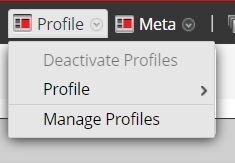
In order to resolve the issue, deactivate the profile to enable options or edit the profile and deselect preference for Meta Group.
To check the current profile used on Investigation:
- Select Investigation > Navigate or Events. Both views provide access to the Manage Profiles dialog.
The Investigate dialog is displayed.
- Select a service, then click Navigate.
- In the toolbar, select Profile
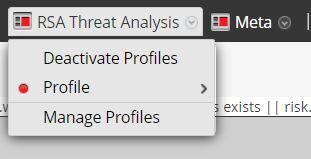
To disable profile, select Deactivate Profiles
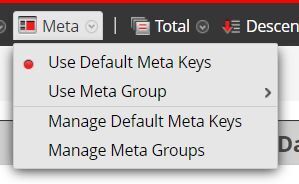
To specify that the initial Navigate view opens using default meta keys:
- Select Investigation > Navigate.
- Select a service, and select Navigate.
- In the Meta menu, select Use Default Meta Keys.
Internal Comments
UserName:jmarcinkowski8/4/2014 6:52:04 PM - Please work with Sahwn Duggan to attach files correctly.
Once redone, please resubmit with updated comment.
UserName:shurtj
8/12/2014 2:13:24 PM - Reworked and Approved Article
Updated article and made changes to abide by Primus best practices. Removed the Note statement as the images did not display correctly.
UserName:wonchul.park@rsa.com
8/25/2014 6:32:49 AM - Reworked
Finished redone after getting the access for shared directory to upload images.
UserName:shurtj
8/25/2014 7:13:35 PM - Minor Changes
Minor changes were made to the reworked article to abide by Primus best practices.
UserName:almirm
9/2/2019 3:42 PM - Update Article
Update article for NW 10.6.x/11.x
Product Details
RSA Product Set: NetWitness Logs & NetworkRSA Product/Service Type: Admin Server
RSA Version/Condition: 10.6.x, 11.x
Approval Reviewer Queue
RSA NetWitness Suite Approval Queue