.png?width=180&height=32&name=NW%20Logo%20(2).png)
Issue
>sans-serif;>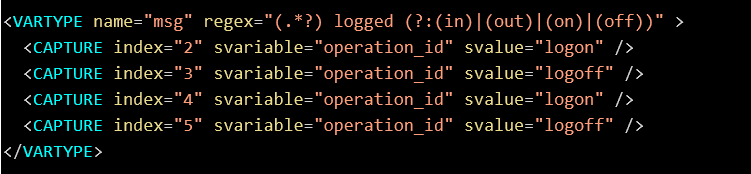
sans-serif;>The elements must be the child elements of the element. Hence
Tasks
sans-serif;>Valid email address (11.2.1 and later versions) all captures are ignored.the value will be inherited from the parent . Refer the following screenshot.
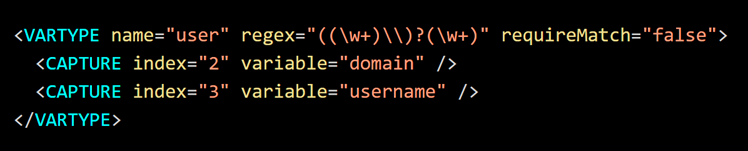
Note: The attribute
requireMatch is added in 11.3 and later versions. When multiple format types are provided
timeline Description automatically generated src=https://netwitness.file.force.com/servlet/rtaImage?eid=ka0Rm0000004BLS&feoid=00N5Y00000TPmRL&refid=0EM4z0000050ox7 style=width: 624px;height: 114px;>
sans-serif;> insans-serif;>Type variables are applied on a per parser basis. Thus
Cause
>sans-serif;>In the above exampleso long as they meet the hierarchy requirements.
Workaround
>transformation is achieved by mapping the static value ‘http’ to variable ‘protocol’ for port ‘80’.sans-serif;>Where should elements be placed?
Resolution
Typed variables (also called as VARTYPE) added in 11.0 and later versions, provide type and pattern validation for variables. While the variables are parsed, you can conditionalize them to match a certain format. For Example, consider the following parser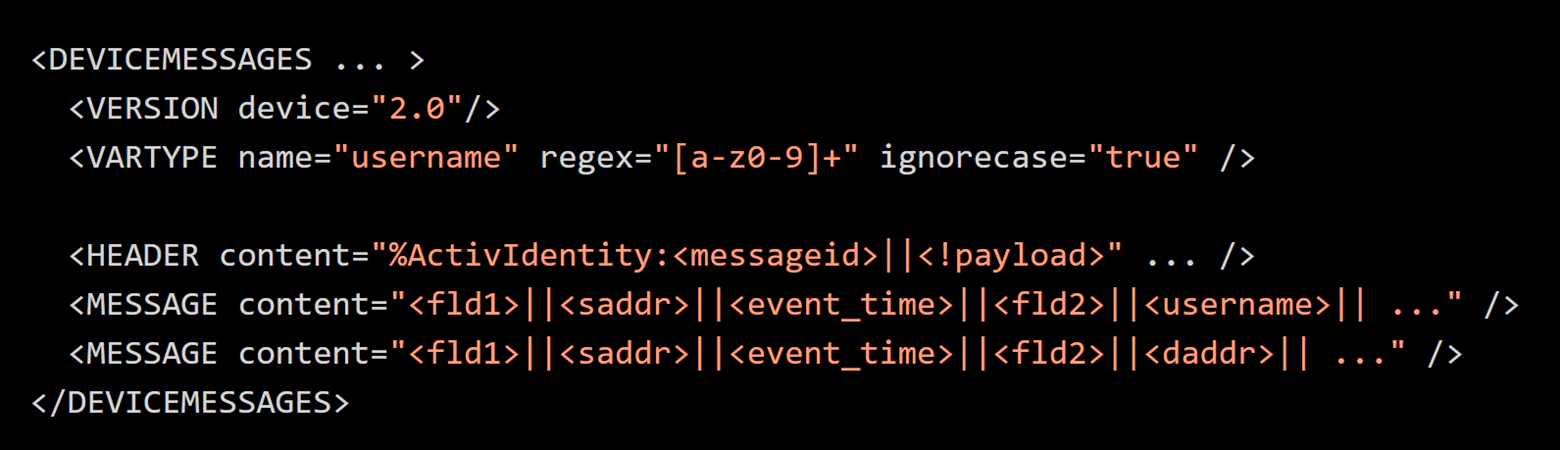
Using VARTYPE, you can define the username variable to contain only characters and numbers, and fail the MESSAGE pattern match. In this case, username is a typed variable.
As shown in the above example, the variable name is specified using the name attribute. The regular expression defines the criteria that username must meet the specific condition ( [a-z0-9]+). If 192.168.1.1 is found where the username variable resides in a pattern, the pattern will not match.
Note: In 11.2.1, typed variables allow the capture of parsed values to other variables.
Typed Variables Formats
1. regex
This functionality uses the standard regular expression syntax. Use the ignorecase attribute to toggle the case sensitivity. By default, regular expressions are case sensitive. Hence, the below two statements are identical.

Note: The ignorecase attribute is optional.
In 11.5, enable regex search (instead of match) using the search attribute. By default, this attribute is set to false, resulting in regex match. Match requires the entire input to match the expression. Refer the following screenshot.

2. dateTime
The dateTime format was added in 11.5 and later versions. It includes a list of format specifiers for parsing timestamps. Refer the following screenshot.
3. format
You can set the criteria for a typed variable using the format attribute as well. The value of the attribute for the respective variables are predefined types that define the type the variables must have for a match to happen. For example, you can define the variable hostIP as a typed variable, if some log messages are incorrectly assigning it a value of hostname.com instead of valid IPs. Refer the following screenshot. 
In this case, only IPs of the format XXX.XXX.XXX.XX will match and not the value of hostname.com.
The below table lists all the valid types of formats.
Product Detail
RSA Product Set: NetWitness Logs and Network
RSA Product/Service Type: Log Decoder
RSA Version/Condition: 11.x and Above
Platform: CentOS