.png?width=180&height=32&name=NW%20Logo%20(2).png)
Issue
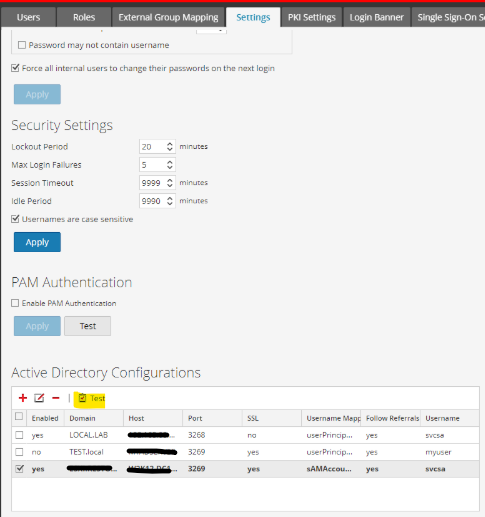
When configuring NetWitness Active Directory with SSL enabled, the test connection may fail on the Admin-Security-Settings page.
Cause
This issue often arises because the SSL certificate's Subject Alternative Name (SAN) does not match the host configured in the Active Directory settings in NetWitness.
Steps to Validate the Subject Alternative Name Field:
- Extract the Certificate:
openssl s_client -connect <ActiveDirectory_IP>:<port> > certs.pem - View the Extracted Certificate in Text Format:
openssl x509 -in certs.pem -noout -text
The output may show multiple certificates, including the server certificate and Sub-CA sent by Active Directory. Scroll back to the server certificate and look for the X509v3 Subject Alternative Name field. Verify that there is an entry matching the hostname configured in NetWitness.
Example:
X509v3 Subject Alternative Name:
 othername:<unsupported>, DNS:W2K12-DC1.esxi.mytest.lab
Resolution
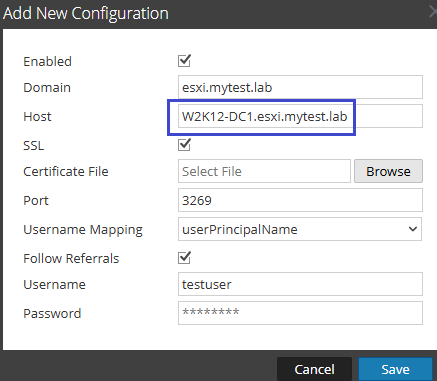
Please configure Host information as shown in X509v3 Subject Alternative Name field in the certificate.
Notes:
Always modify an existing configuration rather than deleting and recreating it, as deleting an AD configuration will also delete the corresponding external group mappings.
You can import a certificate multiple times, and the new certificate or chain will automatically be used when the test button is clicked. Do not import the server certificate only import the Sub-CA and CA certificates.
Notes
Microsoft is starting to use "common" certificates that can cover multiple domains. These certificates may not have a Subject field but must have a populated SAN field. The SAN field must contain at least the same value as the host field in the AD configuration. The SAN field can be a comma-separated list of domains, with the first entry typically being the hostname of the system the certificate is created for.
Example:
X509v3 Subject Alternative Name:
 othername:<unsupported>, DNS:W2K12-DC1.esxi.mytest.lab
If the Subject Alternative Name (SAN) contains multiple domains/hosts, ensure the hostname of the system is included. If there is a mismatch, it is preferable to generate a new certificate with the correct SAN field.
Product Details
NetWitness Product Set: NetWitness Logs & Network
NetWitness Product/Service Type: NetWitness Platform
NetWitness Version/Condition: 12.4 and above
Platform: AlmaLinux 8.9
Approval Reviewer Queue
Technical approval queue