.png?width=180&height=32&name=NW%20Logo%20(2).png)
Issue
After adding an entry in the index-concentrator-custom.xml file to create a new meta key and restarting the Concentrator service, an Initialization Error is reported which prevents the service from functioning.The initialization Error can be seen on the View -> System page for the Concentrator service, as shown below.

Cause
Initialization Errors can occur when issues are found with the index-concentrator-custom.xml files during the service startup process.A common cause of these issues is when formatted text is copied from a word processor (i.e. Microsoft Word or the textEdit application on Mac OS X) and pasted into the file via the NetWitness UI.
Doing so can change the characters (i.e. quotation marks) to other similar characters that are unsupported by the system, which consequently prevents the service from functioning properly.
In the example below, one of the quotation marks uses a different character than the others, which results in the Initialization Error when restarting the service.
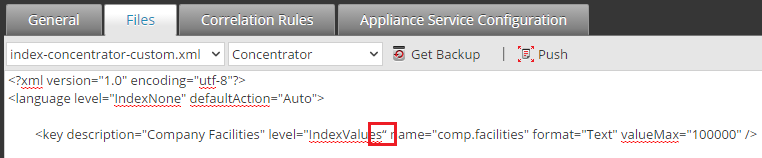
This is confirmed in the /var/log/messages file on the Concentrator appliance, which reports an error similar to the example below after attempting to restart the Concentrator service.
Jun 12 20:05:30 Concentrator nw[19690]: [Engine] [warning] Module concentrator failed to load: Diagnostic information: Throw in function static void nw::LanguageManager::loadLanguageExtensions(const string&, nw::LanguagePtr)Dynamic
exception type: boost::exception_detail::clone_impl<nw::XmlError>std::exception::what: /etc/netwitness/ng/index-concentrator-custom.xml - ERROR: Unexpected character found """ after attribute name "comp.facilities". Looking for equal s
ign "=".[boost::errinfo_at_line_*] = 388
exception type: boost::exception_detail::clone_impl<nw::XmlError>std::exception::what: /etc/netwitness/ng/index-concentrator-custom.xml - ERROR: Unexpected character found """ after attribute name "comp.facilities". Looking for equal s
ign "=".[boost::errinfo_at_line_*] = 388
Resolution
In order to resolve the issue, remove the entry that is causing the issue from the index-concentrator-custom.xml file.After doing so, you may choose to either manually type in the entry or first paste the copied text into a plaintext editor (i.e. Notepad) to strip the formatting and then copy and paste the text from that location into the file.
After making the change, restart the Concentrator service via the Security Analytics UI, at which point the service should initialize successfully.
Product Details
NetWitness Product Set: NetWitness PlatformNetWitness Product/Service Type: Concentrator
NetWitness Version/Condition: 11.x /12.X
Platform: CentOS 7 / Alma
Summary
After adding an entry in the index-concentrator-custom.xml file and restarting the Concentrator service, an Initialization Error is reported which prevents the service from functioning.
Approval Reviewer Queue
Technical approval queue