.png?width=180&height=32&name=NW%20Logo%20(2).png)
Issue
Core Services may encounter issues when certain configurations are modified without proper caution. For example, setting max.query.memory to 0 can cause queries to get stuck, disrupting the service's functionality. Such configuration changes need to be reverted to their optimal values, which are calculated based on available resources. This applies to any other config node changes as well.
Whenever a configuration change is made, the service generates a backup configuration file in the /etc/netwitness/ng/ directory.
Cause
The Core Service malfunction can be caused by:
- Manual configuration changes: Users might modify configurations through the UI or directly edit the
.cfgfiles. Incorrect changes, like settingmax.query.memoryto 0, can lead to service issues. - Accidental configuration changes: Inadvertent UI modifications or typos in the
.cfgfiles can also cause problems.
These configuration changes can lead to:
- Service performance issues: Incorrect configurations might lead to the service malfunctioning, slowing down, or becoming unresponsive.
- Unexpected behavior: The service might exhibit unintended behavior due to the changes.
Resolution
The above mentioned configurations are available in the backend as
When a config node is changed, audit logs are maintained. Users can monitor these Audit logs to understand when and who made the changes. Audit logs are enabled by default, but users can disable them if needed.
Example:
As seen in the below image, the Decoder max.query.memory was changed from "1.95 GB" to "0 GB" on Apr 24th at 09:50 am by the Admin, which is captured on the /var/log/messages file.
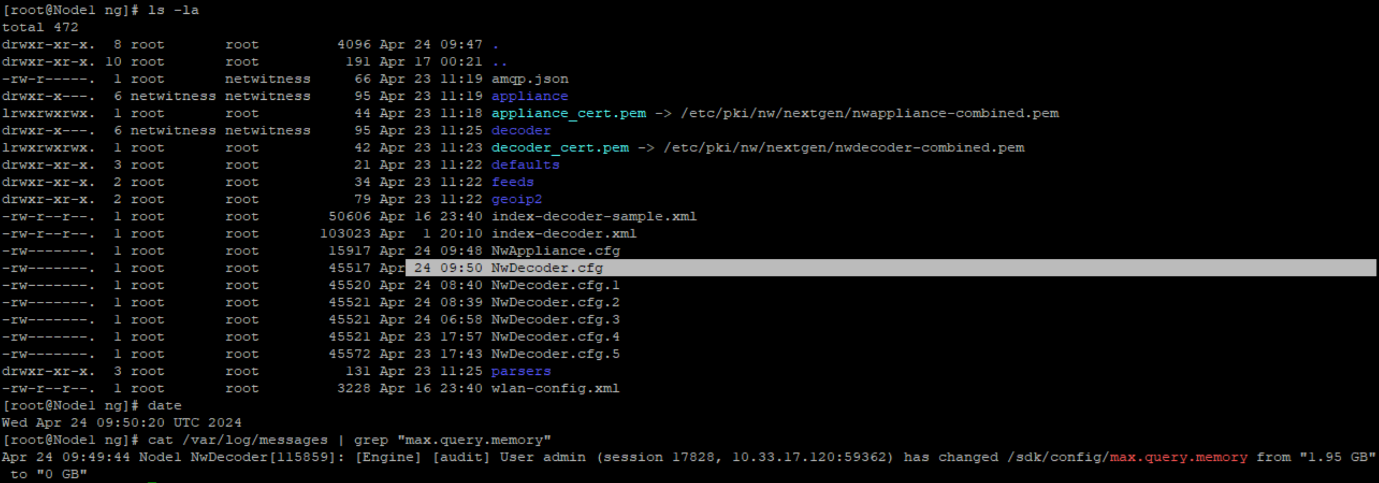
The max.query.memory=1.95GB setting available on the NwDecoder.cfg.1 file with timestamp Apr 24th at 08:40 AM as a backup.
In the event of a probable config issue causing the service to have problems, the user can correlate the time the issue was observed with the timestamp of the backup files. Compare the date and time of the .cfg files, and select the most appropriate .cfg file to restore the configuration.
Users can use this NwDecoder.cfg.1 file and restore the older configuration by following the below steps:
- Identify the Appropriate Backup:
- Compare the timestamps of backup files in the
/etc/netwitness/ng/directory with the time when the issue was first observed.
- Compare the timestamps of backup files in the
- Stop the Decoder service using below command
systemctl stop nwdecoder
- Take a backup of the current NwDecoder.cfg file using below command
mv NwDecoder.cfg NwDecoder.cfg.backup
- Copy the NwDecoder.cfg.1 file which has the optimal max.query.memory value, and rename it as NwDecoder.cfg using below command.
mv NwDecoder.cfg.1 NwDecoder.cfg
- Start the Decoder service using below command
systemctl start nwdecoder
Product Details
NetWitness Product Set: NetWitness PlatformNetWitness Product/Service Type: Core Service (Logdecoder, LogCollector, Decoder,Archiver,Broker,Concentrator)
NetWitness Version/Condition: 12.x
Approval Reviewer Queue
Technical approval queue