.png?width=180&height=32&name=NW%20Logo%20(2).png)
Issue
Running the NetWitness Endpoint Agent "nweagent.exe /testnet" command is failing.Getting the following error.
ERROR: Could not open service key. (Error = 5)

Cause
The NetWitness Endpoint Agent nweagent.exe needs sufficient permission to read the installed certificate.
Resolution
- On the Endpoint Agent machine run the cmd.exe as Administrator.
Right-click the cmd.exe and click on "Run as administrator".
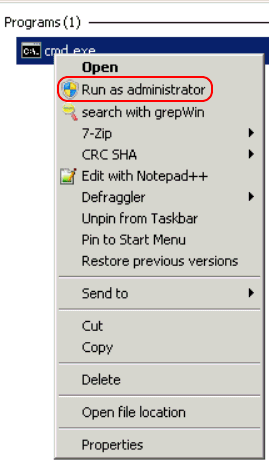
- Run the NWEAgent.exe test again.
C:\Windows\system32\NWEAgent.exe /testnet

Notes
If the "Could not open service key" error still appears then investigate if the Endpoint Agent installer was able to install the "NetWitness Endpoint Intermediate CA" certificate.On the Endpoint Agent machine
Run mmc.exe,
File > Add/Remove Snap-in > Certificates > Add > select Computer account > Finish and click OK
Expand Certificates > Intermediate Certification Authorities
Under Certificates look for the existence of the "NetWitness Endpoint Intermediate CA" certificate.
Review the Endpoint Agent install log file for any error occurring during the NWEAgent service install.
The default path to the install log file on the Endpoint Agent machine is, %TEMP%\EMSINWEAgent.log
Product Details
RSA Product Set: RSA NetWitness PlatformRSA Product/Service Type: Endpoint Server
RSA Version/Condition: 11.x
Platform: Windows
Product Name: Endpoint Agent
Summary
Running the NetWitness Endpoint Agent nweagent.exe /testnet fails with the error Could not open service key.
Approval Reviewer Queue
RSA NetWitness Suite Approval Queue