.png?width=180&height=32&name=NW%20Logo%20(2).png)
Issue
Users will not be able to access ESA deployment configurations in the Policies->Content-> Event Stream Analysis as below.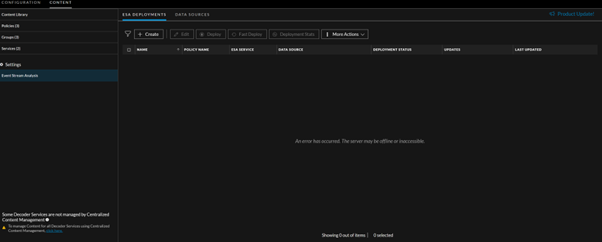
Cause
This issue is due to stale or invalid entries in the source server Mongo.
Resolution
Follow the below steps to clean the invalid deployment entries in the source server Mongo.1. Run the script using the following command on the Admin Server.
mongo localhost/source-server -u
Note: cleanUp.js file attached to this KB Article.
2. Once the script is run successfully, restart the services in the following order.
1. Restart the Jetty service on the admin server.
service jetty restart.
3. Once Jetty is started, Restart all the Correlation Server services.
1. Go to
Admin > services
2. Select correlation-server and restart.
2. Select correlation-server and restart.
4. Verify the
Policies->Content-> Event Stream Analysis tab to see the ESA deployments.
Product Details
RSA Product Set: NetWitness Platform XDRRSA Product/Service Type: Source Server and Correlation Server
RSA Version/Condition: 12.1 and above
Summary
This document outlines the procedure to make ESA deployment visible.
Approval Reviewer Queue
Technical approval queue