.png?width=180&height=32&name=NW%20Logo%20(2).png)
Issue
While configuring a new rule, it is suggested to mark it as Trial rule for a while to assess its effectiveness and stability.
Resolution
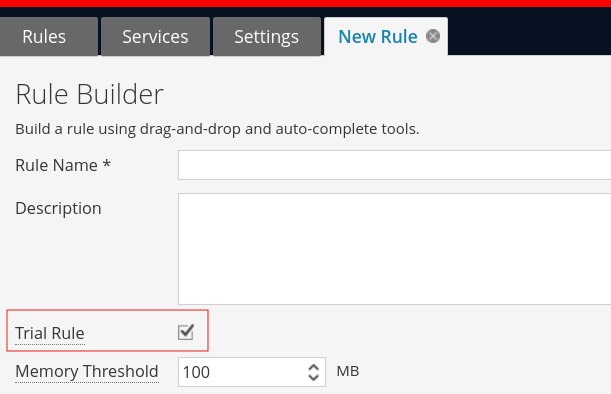
Example of how to mark a rule as a "Trial Rule" when building or editing it in the UI:
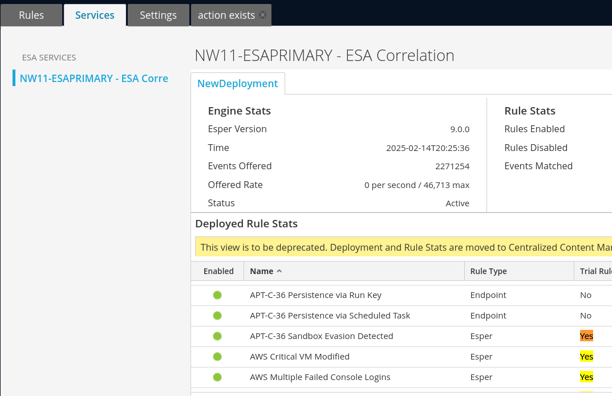
How to determine if a deployed rule is a "Trial Rule" in the old ESA Rule>Services Interface:
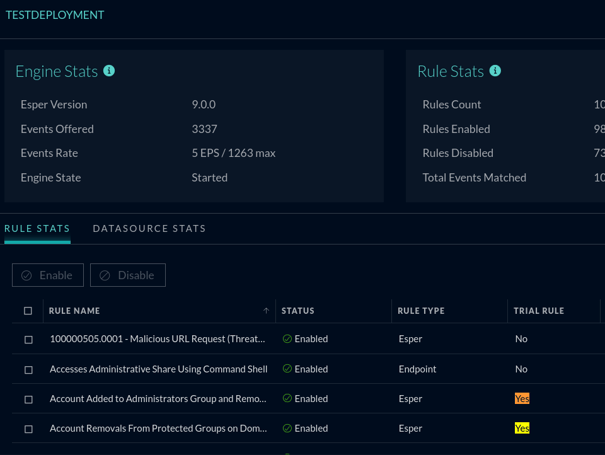
How to determine if a deployed rule is a "Trial Rule" in In the new Deployment Stats interface:
When we configure a rule as "Trial Rule", ESA does the following:
- Periodically checks memory utilization
- If memory utilization exceeds the threshold, all rules marked as trial will get disabled
- Threshold values - Memory Utilization 85% / Check Interval 300 seconds
- These prevents any bad/misconfigured rules from crashing the correlation-server service.
Product Details
NetWitness Product Set: NetWitness Logs & Network
NetWitness Product/Service Type: ESA/Correlation-Server
NetWitness Version/Condition: 11.x , 12.x
Platform: CentOS , AlmaLinux
Approval Reviewer Queue
Technical approval queue