.png?width=180&height=32&name=NW%20Logo%20(2).png)
Issue
File Collection using SFTP agent on Windows stops after upgrade to 12.4.
Cause
The 12.4 version upgrades the openSSH package from 7.4 to 8.0 which no longer accepts SSH keys with 1024 bit lengths.This is can be clearly seen in the /var/log/secure when trying to initiate the connection from the SFTP agent's side:
May 2 11:31:12 EPLH sshd[2123009]: error: userauth_pubkey:
could not parse key: Invalid key length [preauth]
May 2 11:31:12 EPLH sshd[2123009]: error: Received disconnect from 192.168.255.33 port 61223:14: No supported authentication methods available [preauth]
May 2 11:31:12 EPLH sshd[2123009]: Disconnected from authenticating user sftp 192.168.255.33 port 61223 [preauth]
May 2 11:31:12 EPLH sshd[2123009]: error: Received disconnect from 192.168.255.33 port 61223:14: No supported authentication methods available [preauth]
May 2 11:31:12 EPLH sshd[2123009]: Disconnected from authenticating user sftp 192.168.255.33 port 61223 [preauth]
Error from the SFTP agent's side:
C:\sasftpagent>psftp -i private.ppk -l sftp -v 192.168.89.104
Connecting to 192.168.89.104 port 22
We claim version: SSH-2.0-PuTTY_Release_0.70
Server version: SSH-2.0-OpenSSH_8.0
Using SSH protocol version 2
Doing ECDH key exchange with curve Curve25519 and hash SHA-256
Server also has ssh-rsa host key, but we don't know it
Host key fingerprint is:
ecdsa-sha2-nistp256 256 bc:ed:6e:17:82:c6:2a:dd:b1:f4:40:09:90:56:06:b1
Host key was located in the environment
Initialised AES-256 SDCTR client->server encryption
Initialised HMAC-SHA-256 client->server MAC algorithm
Initialised AES-256 SDCTR server->client encryption
Initialised HMAC-SHA-256 server->client MAC algorithm
Reading key file "private.ppk"
Using username "sftp".
I've read & consent to terms in IS user agreement.
Offered public key
Server refused our key
Server refused our key
Disconnected: No supported authentication methods available (server sent: publickey)
Fatal: Disconnected: No supported authentication methods available (server sent: publickey)
Connecting to 192.168.89.104 port 22
We claim version: SSH-2.0-PuTTY_Release_0.70
Server version: SSH-2.0-OpenSSH_8.0
Using SSH protocol version 2
Doing ECDH key exchange with curve Curve25519 and hash SHA-256
Server also has ssh-rsa host key, but we don't know it
Host key fingerprint is:
ecdsa-sha2-nistp256 256 bc:ed:6e:17:82:c6:2a:dd:b1:f4:40:09:90:56:06:b1
Host key was located in the environment
Initialised AES-256 SDCTR client->server encryption
Initialised HMAC-SHA-256 client->server MAC algorithm
Initialised AES-256 SDCTR server->client encryption
Initialised HMAC-SHA-256 server->client MAC algorithm
Reading key file "private.ppk"
Using username "sftp".
I've read & consent to terms in IS user agreement.
Offered public key
Server refused our key
Server refused our key
Disconnected: No supported authentication methods available (server sent: publickey)
Fatal: Disconnected: No supported authentication methods available (server sent: publickey)
Resolution
To resolve this issue, a new SSH having a bit length of 2048 bits or more has to be generated.Steps to generate a new SSH key pair for the SFTP agent:
1) On the windows host, open the sasftpagent directory (where the NetWitness SFTP agent is installed)
2) Open puttygen.exe
3) Edit the key parameters in the bottom section, make sure to set the bit length to 2048 or more then click generate:
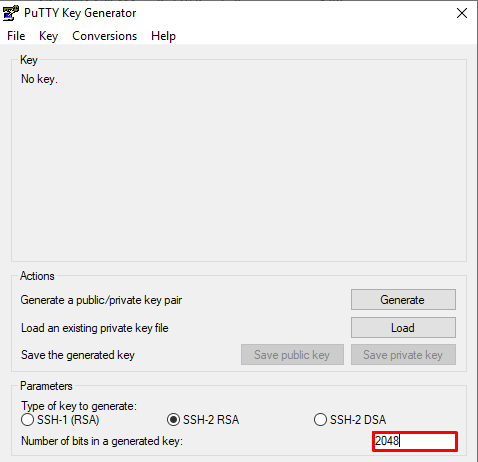
4) Generate some randomness by moving the mouse cursor inside the blank area
5) Once the key is generated, copy the public key from the textbox directly:
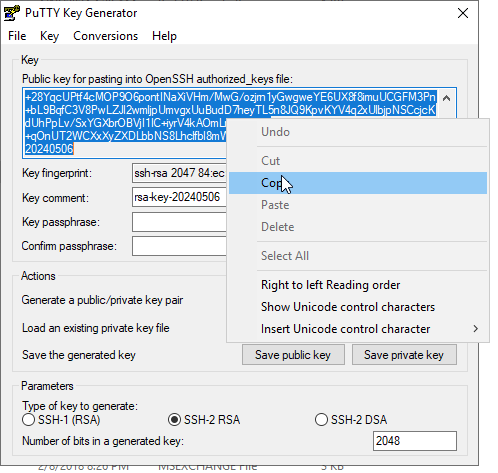
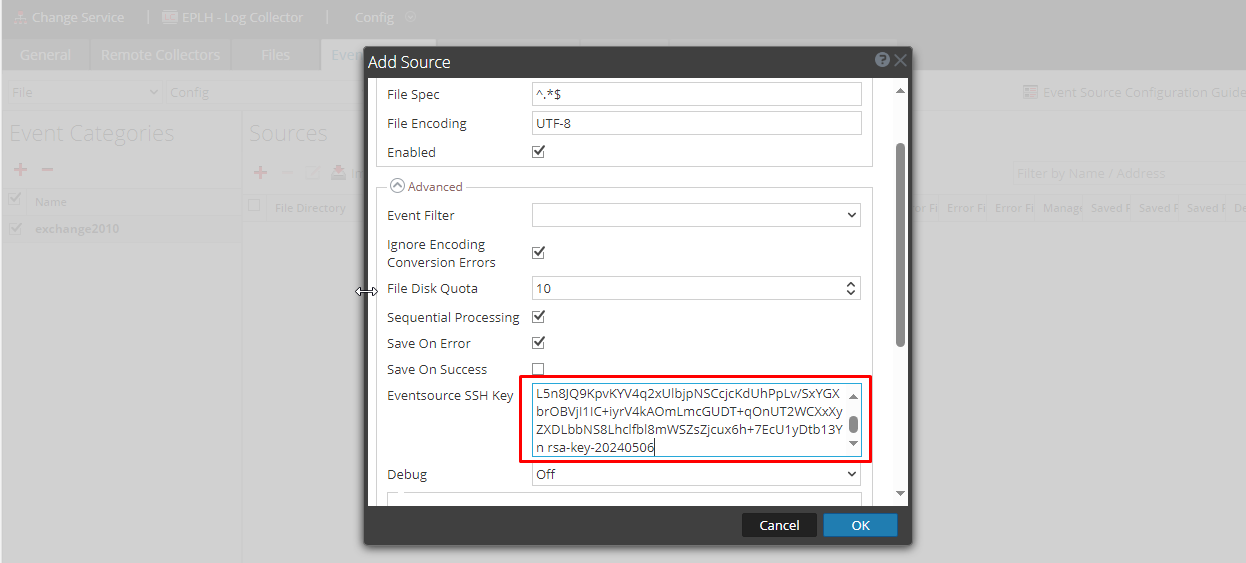
6) Paste the key directly into the Log Collector/VLC file collection event source then hit Save. (Admin>Services>Log Collector>View>Config>Event Sources>File>Event Category>Source>Edit):
7) Back to the Windows host, click on "Save Private Key" then click Yes, name the file and choose where to save it
8) Once saved, open an Administrator CMD in the sasftpagent directory, and run the below command:
psftp -i <path\to\private key> -l sftp -v 192.168.89.104
9) Here's the expected output:
C:\sasftpagent>psftp -i private.ppk -l sftp -v 192.168.89.104
Connecting to 192.168.89.104 port 22
We claim version: SSH-2.0-PuTTY_Release_0.70
Server version: SSH-2.0-OpenSSH_8.0
Using SSH protocol version 2
Doing ECDH key exchange with curve Curve25519 and hash SHA-256
Server also has ssh-rsa host key, but we don't know it
Host key fingerprint is:
ecdsa-sha2-nistp256 256 bc:ed:6e:17:82:c6:2a:dd:b1:f4:40:09:90:56:06:b1
Host key was located in the environment
Initialised AES-256 SDCTR client->server encryption
Initialised HMAC-SHA-256 client->server MAC algorithm
Initialised AES-256 SDCTR server->client encryption
Initialised HMAC-SHA-256 server->client MAC algorithm
Reading key file "private.ppk"
Using username "sftp".
I've read & consent to terms in IS user agreement.
Offered public key
Offer of public key accepted
Authenticating with public key "rsa-key-20240506"
Sent public key signature
Access granted
Opening session as main channel
Remote debug message: /upload/.ssh/authorized_keys:2: key options: agent-forwarding port-forwarding pty user-rc x11-forwarding
Remote debug message: /upload/.ssh/authorized_keys:2: key options: agent-forwarding port-forwarding pty user-rc x11-forwarding
Opened main channel
Started a shell/command
Connected to 192.168.89.104
Remote working directory is /upload
Connecting to 192.168.89.104 port 22
We claim version: SSH-2.0-PuTTY_Release_0.70
Server version: SSH-2.0-OpenSSH_8.0
Using SSH protocol version 2
Doing ECDH key exchange with curve Curve25519 and hash SHA-256
Server also has ssh-rsa host key, but we don't know it
Host key fingerprint is:
ecdsa-sha2-nistp256 256 bc:ed:6e:17:82:c6:2a:dd:b1:f4:40:09:90:56:06:b1
Host key was located in the environment
Initialised AES-256 SDCTR client->server encryption
Initialised HMAC-SHA-256 client->server MAC algorithm
Initialised AES-256 SDCTR server->client encryption
Initialised HMAC-SHA-256 server->client MAC algorithm
Reading key file "private.ppk"
Using username "sftp".
I've read & consent to terms in IS user agreement.
Offered public key
Offer of public key accepted
Authenticating with public key "rsa-key-20240506"
Sent public key signature
Access granted
Opening session as main channel
Remote debug message: /upload/.ssh/authorized_keys:2: key options: agent-forwarding port-forwarding pty user-rc x11-forwarding
Remote debug message: /upload/.ssh/authorized_keys:2: key options: agent-forwarding port-forwarding pty user-rc x11-forwarding
Opened main channel
Started a shell/command
Connected to 192.168.89.104
Remote working directory is /upload
For the detailed steps, you can follow this YouTube video, just make sure to set the key to 2048 or more.
Product Details
NetWitness Product Set: NetWitness PlatformNetWitness Product/Service Type: Log Collector, SFTP Agent
NetWitness Version/Condition: 12.4
Platform: AlmaLinux
O/S Version: 8.9
Approval Reviewer Queue
Technical approval queue