.png?width=180&height=32&name=NW%20Logo%20(2).png)
Issue
The link LED for the iDRAC interface does not light up when the iDRAC is correctly configured and the network cable is firmly connected to both the iDRAC port and the switch.The other ports can be connected successfully using the same network cable.
Cause
The iDRAC interface may appear to be offline if Auto Negotiation is set to Off as shown below and the currently configured setting is not supported by the switch.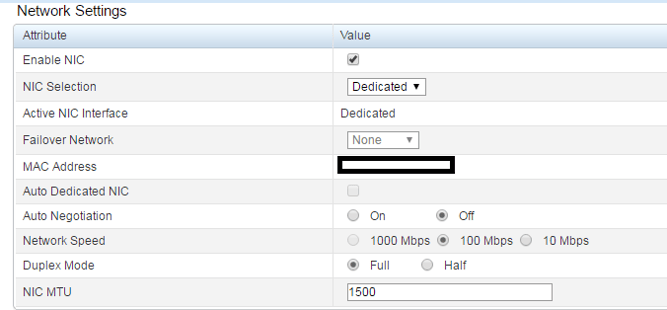
Resolution
In order to resolve the issue, set Auto Negotiation to On using the iDRAC setting utility by referencing the Integrated Dell Remote Access Controller 9 User's GuideProduct Details
NetWitness Product Set: NetWitness Logs & NetworkNetWitness Product/Service Type: Admin Server
NetWitness Version/Condition: 10.x, 11.x, 12.x
Platform: CentOS / AlmaLinux
O/S Version: 7 / 8.9
Approval Reviewer Queue
Technical approval queue