.png?width=180&height=32&name=NW%20Logo%20(2).png)
Issue
When Orphan RabbitMQ queues exist in the VLC, all the collected logs will become stuck in orphaned queues.The Orphan queues can be identified as having no consumers.
On the VLC run the following command.
rabbitmqctl list_queues -p logcollection consumers name messages
The below sample output shows as two sets of queues as XXX.Addl_Dec with consumer count as 1 (in First column) and shovel.XXX.CHN_VLC with consumer count as 0 (in First column). Shovel queues with consumer count as 0 and messages as Non-Zero value (in Third column) are the orphan queues. Orphan queues are highlighted in the below output.
[root@XXX-VLC-01 ~]#
rabbitmqctl list_queues -p logcollection consumers name messages
Listing queues ...
1 shovel.checkpoint.Addl_Dec 0
1 shovel.cmdscript.Addl_Dec 0
1 shovel.file.Addl_Dec 0
1 shovel.netflow.Addl_Dec 0
1 shovel.odbc.Addl_Dec 0
1 shovel.sdee.Addl_Dec 0
1 shovel.snmptrap.Addl_Dec 0
1 shovel.syslog.Addl_Dec 0
1 shovel.vmware.Addl_Dec 0
1 shovel.windows.Addl_Dec 0
1 rabbitmq.log 0
0 shovel.checkpoint.CHN_VLC 0
0 shovel.cmdscript.CHN_VLC 0
0 shovel.file.CHN_VLC 1093607
0 shovel.netflow.CHN_VLC 0
0 shovel.odbc.CHN_VLC 0
0 shovel.sdee.CHN_VLC 0
0 shovel.snmptrap.CHN_VLC 0
0 shovel.syslog.CHN_VLC 524270
0 shovel.vmware.CHN_VLC 0
0 shovel.windows.CHN_VLC 27788
[root@XXX-VLC-01 ~]#
Listing queues ...
1 shovel.checkpoint.Addl_Dec 0
1 shovel.cmdscript.Addl_Dec 0
1 shovel.file.Addl_Dec 0
1 shovel.netflow.Addl_Dec 0
1 shovel.odbc.Addl_Dec 0
1 shovel.sdee.Addl_Dec 0
1 shovel.snmptrap.Addl_Dec 0
1 shovel.syslog.Addl_Dec 0
1 shovel.vmware.Addl_Dec 0
1 shovel.windows.Addl_Dec 0
1 rabbitmq.log 0
0 shovel.checkpoint.CHN_VLC 0
0 shovel.cmdscript.CHN_VLC 0
0 shovel.file.CHN_VLC 1093607
0 shovel.netflow.CHN_VLC 0
0 shovel.odbc.CHN_VLC 0
0 shovel.sdee.CHN_VLC 0
0 shovel.snmptrap.CHN_VLC 0
0 shovel.syslog.CHN_VLC 524270
0 shovel.vmware.CHN_VLC 0
0 shovel.windows.CHN_VLC 27788
[root@XXX-VLC-01 ~]#
All the orphaned logs will continue to use up disk space on the VLC local directory until they are processed or deleted.
NW 10.6.x: /var/netwitness/logcollector/rabbitmq/mnesia/sa@localhost/msg_store_persistent/
NW 11.x & 12.x: /var/netwitness/rabbitmq/mnesia/rabbit@*/msg_stores/vhosts/*/msg_store_persistent/
Cause
These orphaned queues get created when the Destination Groups (found in Admin>Services>{VLC}>Config>Local Collectors) get renamed without first removing the queues created underneath.Resolution
Create consumers for the orphaned RabbitMQ queues in VLC
- Login to NetWitness UI, as administrator and navigate to Admin > Services > {VLC} > Config, Local Collectors tab
- Remove any existing Destination Groups, like Addl_Dec in the above example.
- Add a new Destination Groups entry with the same name as the queues with orphaned logs, like CHN_VLC in the below screenshot.
Note: As per the above RabbitMQ example output, queues XXX.CHN_VLC have consumer count as 0 and non-zero messages count.
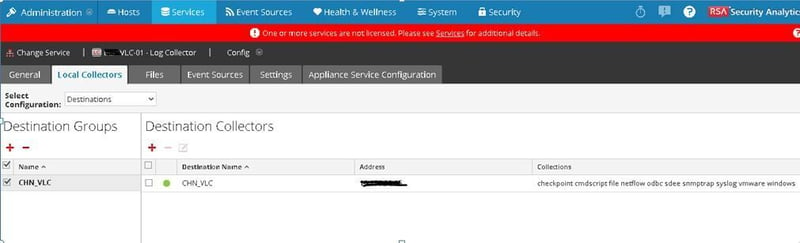
- In a SSH session to the VLC verify there are now consumers for the orphaned queues, like XXX.CHN_VLC using the below command.
[root@XXX-VLC-01 ~]# rabbitmqctl list_queues -p logcollection consumers name messages
Listing queues ...
1 rabbitmq.log 0
1 shovel.checkpoint.CHN_VLC 0
1 shovel.cmdscript.CHN_VLC 0
1 shovel.file.CHN_VLC 1092007
1 shovel.netflow.CHN_VLC 0
1 shovel.odbc.CHN_VLC 0
1 shovel.sdee.CHN_VLC 0
1 shovel.snmptrap.CHN_VLC 0
1 shovel.syslog.CHN_VLC 523170
1 shovel.vmware.CHN_VLC 0
1 shovel.windows.CHN_VLC 26588
[root@XXX-VLC-01 ~]# - (Optional) If the outstanding logs count is very large (millions) then stop all the log collections until most of the queued logs are processed. Do this by navigating to NW UI, Admin > Services > {VLC} > System. For each running Collection choose stop (Syslog, Windows, Checkpoint, .. etc). Remember to start the Collections again later.
- Monitor with the rabbitmqctl list_queues -p logcollection consumers name messages command to ensure the messages count keeps reducing.
Note: The rabbitmq-server service may stop due to overutilization in processing these orphan queues.
Restart the rabbitmq-server service to get the queue processing working again.
NW 10.6.x: service rabbitmq-server start
NW 11.x: systemctl start rabbitmq-server
Alternative: Delete orphaned RabbitMQ queues in VLC
The alternative to processing the outstanding messages in the orphaned queues is to delete the orphaned RabbitMQ queues.Deleting the orphaned RabbitMQ queues will also delete any messages in those queues.
Refer to the following NetWitness Knowledgebase article, At least one VLC queue exists that does not have any consumers in RSA Security Analytics
Product Details
NetWitness Product Set: NetWitness PlatformNetWitness Product/Service Type: Log Decoders & Log Collectors
NetWitness Version/Condition: 10.x,11.x and 12.x
Platform: CentOS / AlmaLinux
Summary
When orphan rabbitmq queues exist in VLC, the logs would not reach the Local Collector. The orphan messages keep piling up in queues. These orphan messages can be processed by creating consumers for the orphan queues.
Approval Reviewer Queue
Technical approval queue