.png?width=180&height=32&name=NW%20Logo%20(2).png)
Issue
Customers may encounter an issue where the /var/log partition on their system shows 100% disk usage when using the df -h command. However, when they check the disk usage of the /var/log directory using the du -sh /var/log command, it shows significantly less occupied space.This discrepancy in disk usage indicates that certain log files are not being purged properly, and the services such as syslog or rsyslog may be holding or preventing these log files (e.g., messages, cron, and secure) from being released, causing the file system to appear full.
Tasks
1. Open a SSH terminal on the affected system.2. Run the following command to list the processes that are holding open files in the /var/log directory:
lsof +L1 /var/log
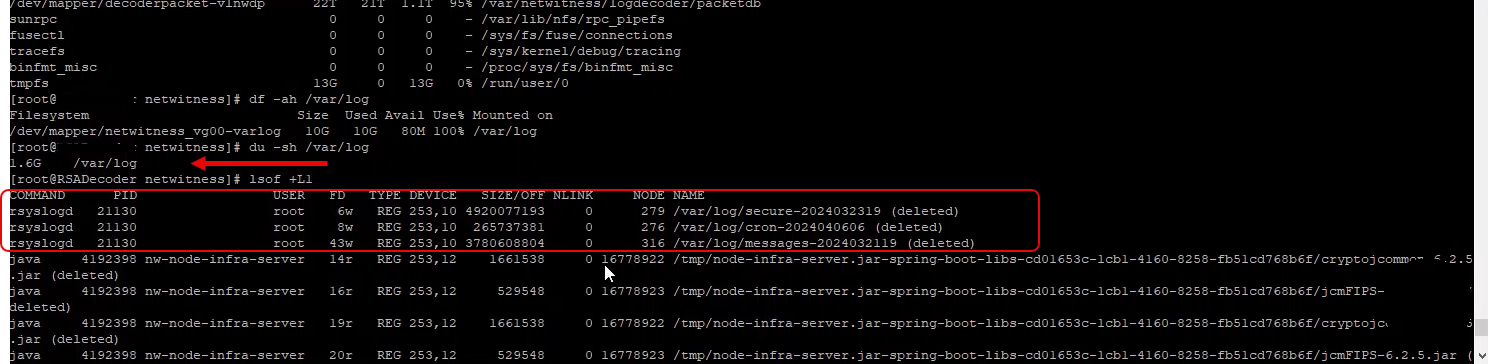
This command will display a list of processes along with the files they have open in the /var/log directory.
3. Look for entries related to rsyslog processes, as this service is a common services responsible for logging activities on AlmaLinux systems.
Resolution
Once you have identified the processes holding the log files, you can take appropriate action to resolve the issue:- Restart the rsyslog service to release/purged the held log files.
systemctl restart rsyslog
Product Details
Product Set: NetWitness PlatformProduct/Service Type: All NetWitness Servers
Version/Condition: 12.x
Platform: CentOS, AlmaLinux
Approval Reviewer Queue
Technical approval queue