.png?width=180&height=32&name=NW%20Logo%20(2).png)
Issue
Unable to connect SA Appliance using root account, received Access denied error in console.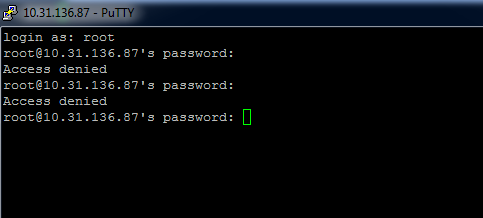
Cause
Root user access can be disabled in /etc/ssh/sshd_config .
Resolution
Connect the appliance through IDrac or SSH with another user and switch to root after the SSH.- 1. To enable ssh root logging, open the file /etc/ssh/sshd_config.
#vi/etc/ssh/sshd_config
- 2. Search for the following line in the file.
# PermitRootLogin yes
- 3. Remove the '#' at the beginning and save the file.
PermitRootLogin yes
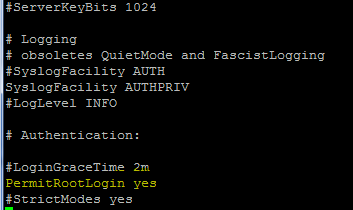
- 4. Restart the sshd service.
# service sshd restart
Product Details
NetWitness Product Set: NetWitness Logs & NetworkNetWitness Product/Service Type: Admin Server
NetWitness Version/Condition: 10.x,11.x and 12.x
Platform: CentOS / AlmaLinux
Summary
In Linux OS, Root login can be disabled. To enable root access, follow this article.
Approval Reviewer Queue
Technical approval queue