.png?width=180&height=32&name=NW%20Logo%20(2).png)
Issue
NetWitness Pre Upgrade Checks show Node Cert ID Check Probe Error as below.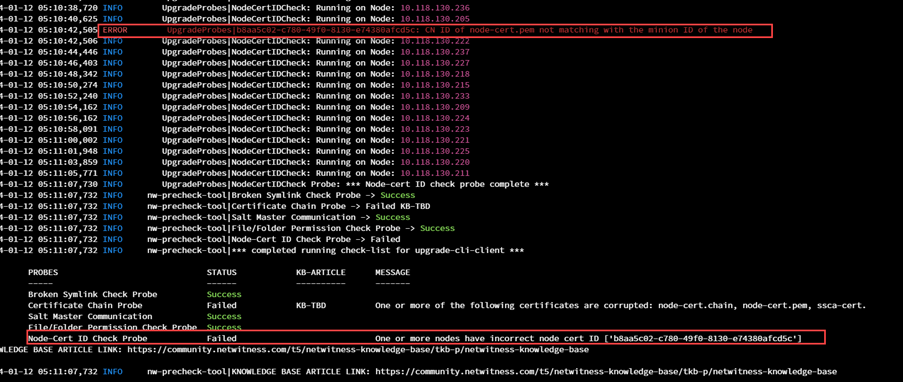
Cause
This error is due to incorrect CN details in /etc/pki/nw/node/node-cert.pem or node-cert.pem file corruption. This file /etc/pki/nw/node/node-cert.pem should have CN details the same as the minion id in /etc/salt/minion. However, the probe was triggered due to a mismatch of CN and minion id as below.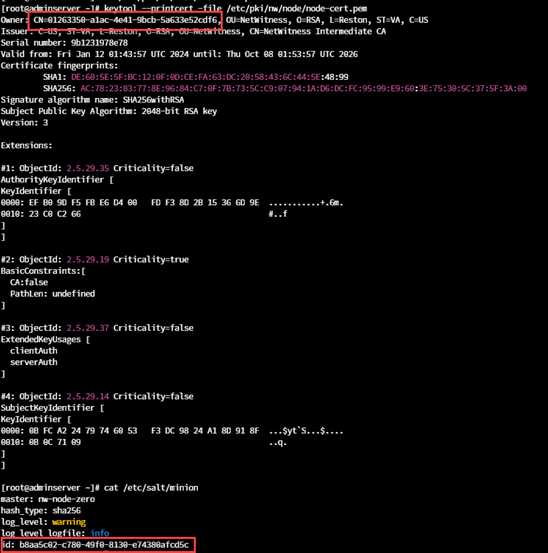
Resolution
Please resolve the Node Cert ID Check Probe Error using the below steps.1. If /etc/pki/nw/node/node-cert.pem CN and /etc/salt/minion minion-id mismatch exists, please delete the /etc/pki/nw/node/node-cert.pem file and run the below command. This will regenerate a new file with the correct CN details.
chef-client -r "recipe[nw-pki]" --config /var/lib/netwitness/config-management/client.rb --json-attributes /etc/netwitness/config-management/node.json
2. Run the following command to determine if node-cert.pem is corrupt or unavailable.
keytool --printcert -file /etc/pki/nw/node/node-cert.pem
If it shows a parse input error as below:

Perform the following steps to resolve the issue:
a. If a backup exists, replace the node-cert.pem with your backup.
b. If a backup is not available, delete the /etc/pki/nw/node/node-cert.pem file.
c. Once the file is deleted. Run the following command:
a. If a backup exists, replace the node-cert.pem with your backup.
b. If a backup is not available, delete the /etc/pki/nw/node/node-cert.pem file.
c. Once the file is deleted. Run the following command:
chef-client -r "recipe[nw-pki]" --config /var/lib/netwitness/config-management/client.rb --json-attributes /etc/netwitness/config-management/node.json
If it shows no such file or directory as below:

Perform the following steps to resolve the issue:
a. If a backup exists, replace the node-cert.pem with your backup.
b. If a backup is not available, then run the following command:
a. If a backup exists, replace the node-cert.pem with your backup.
b. If a backup is not available, then run the following command:
chef-client -r "recipe[nw-pki]" --config /var/lib/netwitness/config-management/client.rb --json-attributes /etc/netwitness/config-management/node.json
Product Details
RSA Product Set: NetWitness PlatformRSA Product/Service Type: All Nodes
RSA Version/Condition: 12.4 or later
Approval Reviewer Queue
Technical approval queue