.png?width=180&height=32&name=NW%20Logo%20(2).png)
Issue
The Precheck tool fails with the error “ One or more ntp not in sync” with a list of UUIDs if the ntp is not in sync.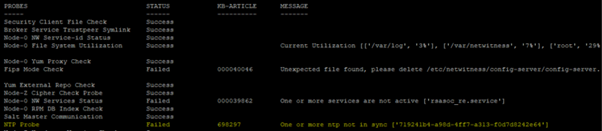
Cause
This issue is due to time/date on NetWitness nodes not being synchronized to the Admin server.
Resolution
Please follow the below steps to restart NTP service on Netwitness Hosts.1. Make sure the UUID is reachable using the below command on Admin-server.
#salt "
" test.ping
Example: #salt "3c757abc-14e7-4907-84e7-32ff680a8f0e" test.ping
Example: #salt "3c757abc-14e7-4907-84e7-32ff680a8f0e" test.ping
3c757abc-14e7-4907-84e7-32ff680a8f0e:
True
2. If UUID is not reachable from Admin-Server, Please follow https://community.netwitness.com/t5/netwitness-knowledge-base/rsa-netwitness-salt-master-communication/ta-p/691591 steps.
True
3. If UUID is reachable, ssh to the UUID/IP of that node.
4. Check the status of ntpd service using the below command.
#systemctl status ntpd.service
5. Restart NTPD service:
#systemctl restart ntpd.service
6. If the NTP sync probe failed on more than 3 nodes due to incorrect NTP server synchronize, run the following on the admin server to synchronize ntp on all NetWitness Hosts to update NTP Server as nw-node-zero:
salt \* service.stop ntpd
salt \* cmd.run 'ntpdate nw-node-zero'
salt \* service.start ntpd
salt \* cmd.run 'ntpdate nw-node-zero'
salt \* service.start ntpd
Note: Asterisk (*) symbol is required as it represents every UUID connected to AdminServer. So, It allows to run the above commands on all connected UUIDs.
Product Details
RSA Product Set: NetWitness Platform XDRRSA Product/Service Type: Platform (ntpd service)
RSA Version/Condition: 12.3 and above
Summary
This document outlines the procedure to synchronize the time on all NetWitness servers.
Approval Reviewer Queue
Technical approval queue