.png?width=180&height=32&name=NW%20Logo%20(2).png)
Issue
The Series 7 package includes two dual-rate 10G/25G SR optical modules (transceivers), which may come in one or more of the following revisions:
- SFP28-10G-25G-SR-85C Rev A00
- SFP28-10G-25G-SR-85C Rev A01
- SFP28-10G-25G-SR-85C Rev A02
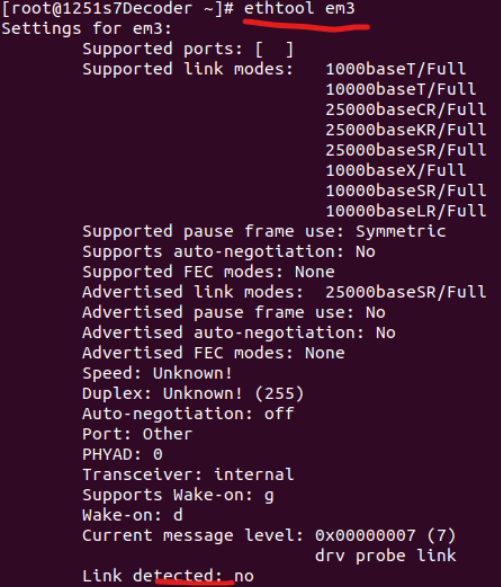
When these transceivers are installed on a Series 7 appliance and connected to a network switch, the appliance interface link detected will be "no", as shown below.
Cause
This issue is due to known issue in nic firmware.
Resolution
Follow the steps below to activate the interface:
- Download the Intel E810 OCP NIC firmware (version 23.0.8) from the following link: Intel NIC Family Version 23.0.0 Firmware for Intel E810 Adapters and Intel E823 LOM
- Login to iDRAC and initiate the Firmware update.
- Complete the Firmware upgrade (Requires reboot of the appliance) using one of the below methods.
- Using IDRAC GUI:
- Using Command line:
- Disable Auto Negotiation on the switch interface.
- To establish a 10Gbps link on the Series 7 appliance, manually set the speed using the following command:
Example: To set the speed to 10Gps on em3 interface, use below command.
ethtool -s <INTERFACE_NAME> advertise 0x80000000000ethtool -s em3 advertise 0x80000000000 - If the interface (example: em3) configuration changes (example: On a Series 7 Decoder, NIC configuration changes such as NicToDp or DpToNic), repeat Step 5.
- If the interface link (example: em3) is not active after Step 5 or Step 6, reboot the Series 7 host.
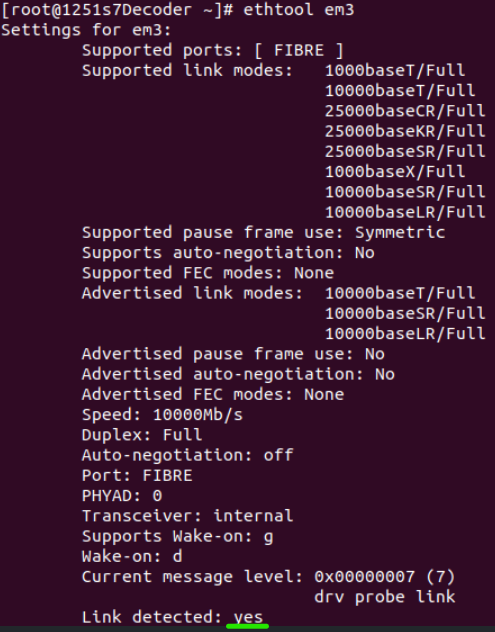
- After the server boots up, the interface link status will be detected as "Yes" as shown below.
Product Details
NetWitness Product Set: NetWitness Logs & Network
NetWitness Product/Service Type: 10G Packet Decoder
NetWitness Version/Condition: 12.5.1.0
Platform: AlmaLinux
Hardware: Series 7 R660
Approval Reviewer Queue
Technical approval queue