.png?width=180&height=32&name=NW%20Logo%20(2).png)
Issue
After upgrading a Netwitness appliance, the reboot does not bring the appliance back up. The iDRAC console shows "FATAL: FIPS Integrity test failed" error as below.
Cause
This issue comes from having the appliance STIG enabled.
Resolution
Please follow the below steps to bring the appliance up.Note: These steps will need to be applied on every reboot as the changes are lost due to having STIG enabled on the NetWitness server.
1. Please do a cold boot in iDRAC UI From the Configuration menu, select Power Management.
From the Power Control drop-down menu, select Power Cycle System(cold boot) as below.
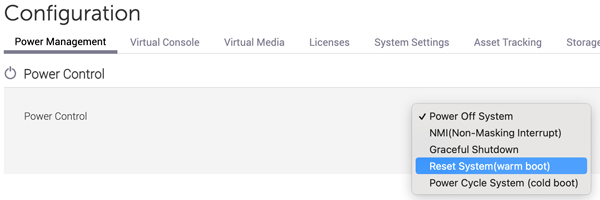
2. On the grub menu press e to enter the username: bootuser and password: netwitness
3. The string fips=1 set it to fips=0 as below.
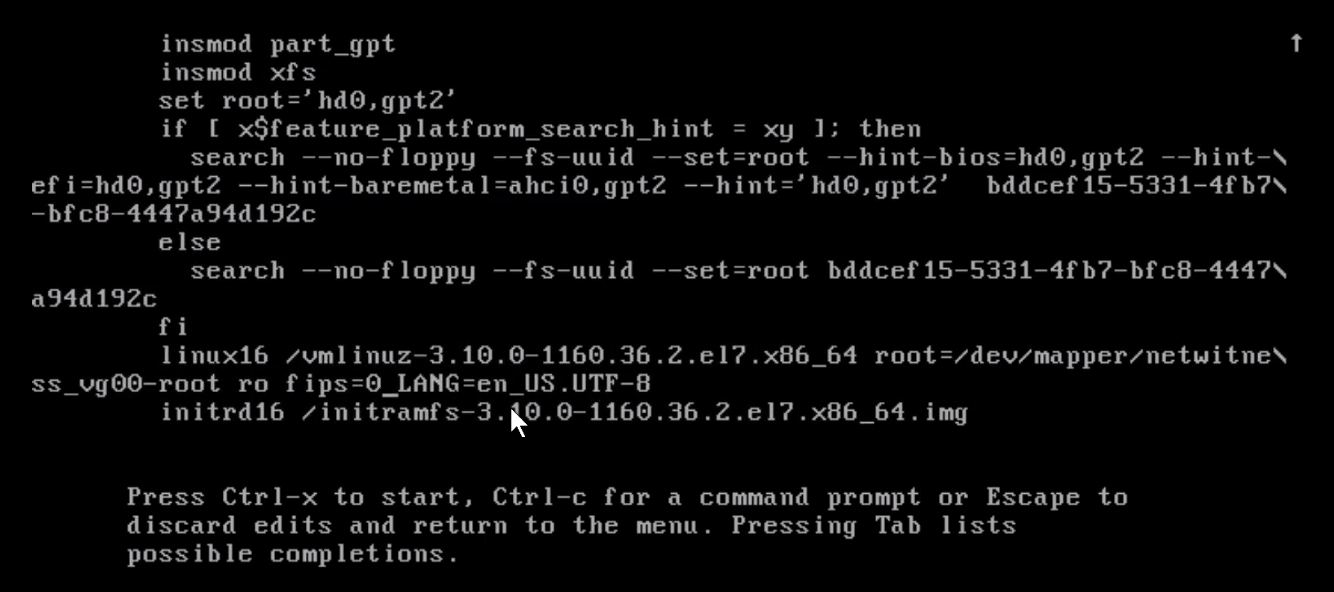
4. Then enter key combination ctrl+x and the appliance will be up now.
Product Details
RSA Product Set: NetWitness Platform
RSA Product/Service Type: Netwitness Appliances.
RSA Version/Condition: 11.X,12.X
Platform: CentOS
O/S Version: 7
Summary
This document outlines the procedure to bring appliances up and running.
Approval Reviewer Queue
Technical approval queue