.png?width=180&height=32&name=NW%20Logo%20(2).png)
Issue
Symptoms:- NetWitness GUI is not accessible
- From /var/netwitness/uax/logs/sa.log, you can see error "Request to admin-server.any./rsa/process/ready timed out"
at java.base/java.lang.Thread.run(Thread.java:834)
[taskScheduler-5] ERROR com.netwitness.platform.server.common.atmosphere.WebSocketSessionExpiry - Error retrieving idle session timeout settings from admin-server
com.rsa.asoc.launch.api.transport.client.RequestTimeoutException: Request to admin-server.any./rsa/process/ready timed out
at com.rsa.asoc.launch.api.transport.client.AmqpTransportClientHelper.requestTimeoutException(AmqpTransportClientHelper.java:51)
at com.rsa.asoc.launch.api.transport.client.AmqpTransportClientHelper.throwRequestTimeoutException(AmqpTransportClientHelper.java:44)
at com.rsa.asoc.launch.api.transport.client.AmqpTransportClient.doSendAndReceive(AmqpTransportClient.java:115)
at com.rsa.asoc.launch.api.transport.client.AmqpTransportClient.send(AmqpTransportClient.java:69)
at com.rsa.asoc.launch.api.transport.client.TransportClientInvocationHandler.makeRemoteCall(TransportClientInvocationHandler.java:68)
at com.rsa.asoc.launch.api.transport.client.TransportClientInvocationHandler.invoke(TransportClientInvocationHandler.java:50)
[taskScheduler-5] ERROR com.netwitness.platform.server.common.atmosphere.WebSocketSessionExpiry - Error retrieving idle session timeout settings from admin-server
com.rsa.asoc.launch.api.transport.client.RequestTimeoutException: Request to admin-server.any./rsa/process/ready timed out
at com.rsa.asoc.launch.api.transport.client.AmqpTransportClientHelper.requestTimeoutException(AmqpTransportClientHelper.java:51)
at com.rsa.asoc.launch.api.transport.client.AmqpTransportClientHelper.throwRequestTimeoutException(AmqpTransportClientHelper.java:44)
at com.rsa.asoc.launch.api.transport.client.AmqpTransportClient.doSendAndReceive(AmqpTransportClient.java:115)
at com.rsa.asoc.launch.api.transport.client.AmqpTransportClient.send(AmqpTransportClient.java:69)
at com.rsa.asoc.launch.api.transport.client.TransportClientInvocationHandler.makeRemoteCall(TransportClientInvocationHandler.java:68)
at com.rsa.asoc.launch.api.transport.client.TransportClientInvocationHandler.invoke(TransportClientInvocationHandler.java:50)
- From /var/log/netwitness/admin-server/admin-server.log, we can see that the certificate is untrusted.
[ main] WARN Security|Certificate for CN=xxxxxxxx-xxxx-xxxx-xxxx-xxxxxxxxxxxxx,OU=NetWitness Platform,O=RSA,L=Reston,ST=VA,C=US issued by CN=Puppet CA: xxxxxxxx-xxxx-xxxx-xxxx-xxxxxxxxxxxxx
is not trusted
- Security-cli-client command (#security-cli-client -p) giving the below error :
Service [config-server] not ready (polling 49 more times)
- Upgrade failing with the following Error :
FATAL: Mixlib::ShellOut::ShellCommandFailed: nw_pki_openssl_hashed_cert[download trustpeer certs for nw-appliance] (nw-appliance::trusts line 10) had an error: Mixlib::ShellOut::ShellCommandFailed: execute[launch-peer-cert:sa-server] (/var/lib/netwitness/config-management/cache/cookbooks/nw-pki/resources/openssl_hashed_cert.rb line 54) had an error: Mixlib::ShellOut::ShellCommandFailed: Command execution failed. STDOUT/STDERR suppressed for sensitive resource
- Find the below errors in the Launch services log files (e.g: /var/log/netwitness/admin-server/admin-server.log, /var/log/netwitness/orchestration-server/orchestration-server.log, /var/log/netwitness/node-infra-server/node-infra-server.log, etc….), while CA and services certificates are not expired
[ main] WARN Security|Certificate for CN=xxxxxxxx-xxxx-xxxx-xxxx-xxxxxxxxxxxxx,OU=NetWitness Platform,O=RSA,L=Reston,ST=VA,C=US issued by CN=Puppet CA: xxxxxxxx-xxxx-xxxx-xxxx-xxxxxxxxxxxxx is not trusted
ERROR CONFIGURATION|call-home failed
org.springframework.amqp.AmqpIOException: javax.net.ssl.SSLException: Fatal Alert received: Bad Certificate
org.springframework.amqp.AmqpIOException: javax.net.ssl.SSLException: Fatal Alert received: Bad Certificate
[MessageListenerContainer-17593] ERROR c.r.a.l.e.t.LaunchMessageListenerContainer|Failed to check/redeclare auto-delete queue(s). org.springframwork.amqp.AmqpIOException: javax.net.ssl.SSLException: Fatal Alert received: {48}
- Also, you can find in /var/log/messages
nwlaunchstatreader.py: Error! Exchange [admin-server] not available for [admin-server.488ce8a3-6fd1-4215-a5c1-68c1b93eb9d0.] Exception: [(404, "NOT_FOUND - no exchange 'admin-server' in vhost '/rsa/system’")]
nwlaunchstatreader.py: Error! Exchange [config-server] not available for [config-server.0d6f669b-2693-4494-bb02-6af065c1ed26.] Exception: [(404, "NOT_FOUND - no exchange 'config-server' in vhost '/rsa/system'")]
Workaround
Note: You can change the Service Name and Service Directory according to which service has the corrupted keystore.
If the errors happened during/after an upgrade, use the last known working keystore (keystore.p12.good.new) to fix the keystore:
If the errors happened during/after an upgrade, use the last known working keystore (keystore.p12.good.new) to fix the keystore:
- SSH into the Admin server.
- Stop rsa-nw-admin-server service:
systemctl stop rsa-nw-admin-server
- Change directory to admin-server:
cd /etc/netwitness/admin-server
- Backup existing keystore file:
mv keystore.p12 keystore.p12.backup
- Replace keystore.p12 with the last known working keystore.p12.good.new:
cp keystore.p12.good.new keystore.p12
- Set permissions and ownership to keystore.p12:
chmod 640 keystore.p12
chown netwitness:netwitness keystore.p12 - Start rsa-nw-admin-server service:
systemctl start rsa-nw-admin-server.service
- Restart the web application server service jetty:
systemctl restart jetty
If the issue was not resolved or these errors are found before the upgrade was initiated, try to fix/reconstruct the keystore of the services through "nw-shell":
- SSH into the Admin server.
- Enter "nw-shell" by running the command:
nw-shell
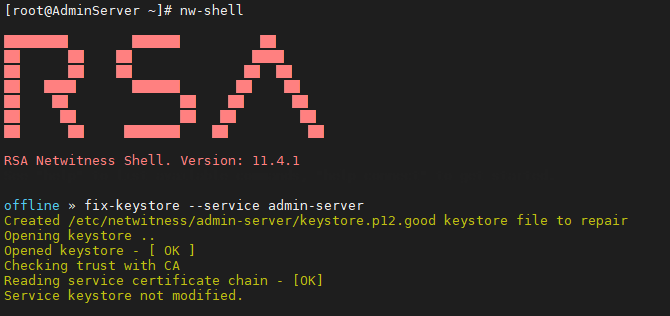
- Run fix-keystore command for the service that has the corrupted keystore (e.g: admin-server)
fix-keystore --service admin-server
- The repaired keystore can be found with the suffix .good (keystore.p12.good)
- Stop rsa-nw-admin-server service:
systemctl stop rsa-nw-admin-server
- Change directory to admin-server:
cd /etc/netwitness/admin-server
- Backup the existing keystore file:
mv keystore.p12 keystore.p12.backup
- Replace keystore.p12 with keystore.p12.good:
cp keystore.p12.good keystore.p12
- Set permissions and ownership to keystore.p12:
chmod 640 keystore.p12
chown netwitness:netwitness keystore.p12 - Start rsa-nw-admin-server service:
systemctl start rsa-nw-admin-server.service
If the issue still is not resolved after fixing the keystore from "nw-shell", try reconstructing the keystore:
- SSH into the Admin server.
- Enter "nw-shell" by running the command:
nw-shell
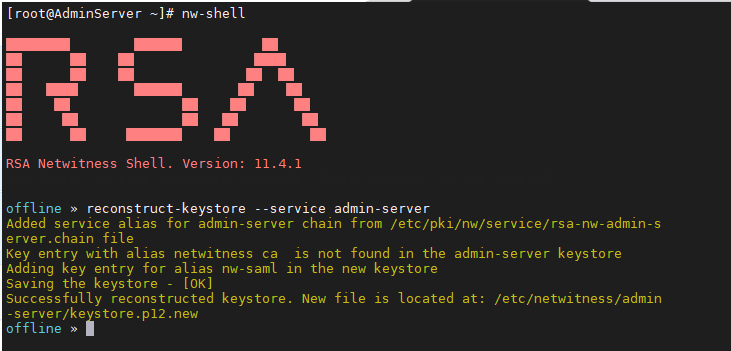
- Run reconstruct-keystore command for the service that has the corrupted keystore (e.g: admin-server)
reconstruct-keystore --service admin-server
- The reconstructed keystore can be found with the suffix .good (keystore.p12.good)
- Stop rsa-nw-admin-server service:
systemctl stop rsa-nw-admin-server
- Change directory to admin-server:
cd /etc/netwitness/admin-server
- Backup existing keystore file:
mv keystore.p12 keystore.p12.backup
- Replace keystore.p12 with keystore.p12.new:
cp keystore.p12.new keystore.p12
- Set permissions and ownership to keystore.p12:
chmod 640 keystore.p12
chown netwitness:netwitness keystore.p12 - Start rsa-nw-admin-server service:
systemctl start rsa-nw-admin-server.service
Resolution
Product Details
NetWitness Product Set: RSA NetWitness PlatformNetWitness Product/Service Type: Core Appliance
NetWitnessVersion/Condition: 11.x, 12.x
O/S Version : EL7
Approval Reviewer Queue
Technical approval queue