.png?width=180&height=32&name=NW%20Logo%20(2).png)
Issue
Administrators are unable to delete roles in NetWitness User Interface.
1. On the NetWitness UI > Admin > Security > Roles
2. Deleting a role throws the following error: "You cannot delete this role as it has Read & Write access to some rule/reports/charts/alerts that will not be accessible on deletion"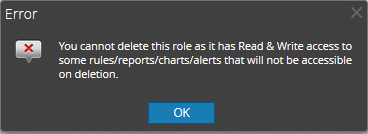
Resolution
1. SSH to Admin Server2. Navigate to /var/netwitness/re-server/rsa/soc/reporting-engine/security-policy/roles
cd /var/netwitness/re-server/rsa/soc/reporting-engine/security-policy/roles
3. Open each file under the directory and confirm the file containing the name of the role.
For example in this case - SOC_Analysts
[root@SRV roles]# cat 89f7a0b767b1fc8242c2fa47ceda8186
<PolicySet xmlns="urn:oasis:names:tc:xacml:2.0:policy:schema:os" PolicySetId="RPS:SOC_Managers" PolicyCombiningAlgId="urn:oasis:names:tc:xacml:1.0:policy-combining-algorithm:permit-overrides">
<Target>
<Subjects>
<Subject>
<SubjectMatch MatchId="urn:oasis:names:tc:xacml:1.0:function:anyURI-equal">
<AttributeValue DataType="http://www.w3.org/2001/XMLSchema#anyURI">urn:com:rsa:netwitness:carlos:roles:SOC_Managers</AttributeValue>
<SubjectAttributeDesignator AttributeId="urn:oasis:names:tc:xacml:2.0:subject:role" DataType="http://www.w3.org/2001/XMLSchema#anyURI"/>
</SubjectMatch>
</Subject>
</Subjects>
</Target>
<PolicySetIdReference>PPS:SOC_Analysts</PolicySetIdReference>
</PolicySet>
4. Move the file to /tmp directory
<PolicySet xmlns="urn:oasis:names:tc:xacml:2.0:policy:schema:os" PolicySetId="RPS:SOC_Managers" PolicyCombiningAlgId="urn:oasis:names:tc:xacml:1.0:policy-combining-algorithm:permit-overrides">
<Target>
<Subjects>
<Subject>
<SubjectMatch MatchId="urn:oasis:names:tc:xacml:1.0:function:anyURI-equal">
<AttributeValue DataType="http://www.w3.org/2001/XMLSchema#anyURI">urn:com:rsa:netwitness:carlos:roles:SOC_Managers</AttributeValue>
<SubjectAttributeDesignator AttributeId="urn:oasis:names:tc:xacml:2.0:subject:role" DataType="http://www.w3.org/2001/XMLSchema#anyURI"/>
</SubjectMatch>
</Subject>
</Subjects>
</Target>
<PolicySetIdReference>PPS:SOC_Analysts</PolicySetIdReference>
</PolicySet>
[root@SRV roles]# mv 89f7a0b767b1fc8242c2fa47ceda8186 /tmp
5. Restart the reporting-engine service
systemctl restart rsasoc_re
6. Try deleting the roles from the UI and the custom roles should be successfully deleted.
Notes
For administrators to see all the rules, please turn on the checkbox ' Allow Administrators Full Access' under Reporting Engine->Config->General. This will show adminisrators all the rules created where they can change the access permission.Product Details
NetWitness Product Set: NetWitness PlatformNetWitness Product/Service Type: NetWitness UI, Reporting Engine
NetWitness Version/Condition: 11.X,12.X
Platform: CentOS 7 /Alma
Approval Reviewer Queue
Technical approval queue