.png?width=180&height=32&name=NW%20Logo%20(2).png)
Issue
NetWitness Decoder/Hybrid upgrade will fail when the Network Decoder service has PF_RING Capture selected.Navigate to Admin -> Services -> #DecoderName# -> Config -> General -> Decoder Configuration -> Capture Interface Selected.

The PF_RING Capture Device on the Network Decoder and Network Hybrid is no longer supported as of NetWitness Platform 12.4 and later.
Note :The steps given in the resolution will work on the decoder which has only one adapter enabled with pfring.
The single adapter configuration with pfring looks like.
- For multi-interface capture: capture.interface=PFRINGZC,em3 along with capture.device.params=device=zc:em3,zc:em4
- For single interface capture: capture.interface=PFRINGZC,em3
The steps given in the resolution will not work on the decoder which has multiple adapters.
Multiple adapter configuration looks like below.
Capture.interface= PFRINGZC,em3; PFRINGZC,em4; packet_mmap,em2.
Here the multiple adapters are PFRING in em3 and packet_mmap in em2
For Multiple adapter configuration, follow the steps given in the below link
https://community.netwitness.com/t5/netwitness-platform-online/optional-data-plane-development-kit-packet-capture/ta-p/669132#Manually
Resolution
As of 12.4 the PF_RING Capture device is no longer supported by NetWitness. The newer Data Plane Development Kit (DPDK) should be selected for fast packet processing and considered a direct replacement for any situation where PF_RING would have been used.How to migrate from PF_RING to DPDK
1. Navigate to Admin -> Services -> #DecoderName# -> View -> Explore
2. Right click on the decoder node and select Properties.
3. From the drop down select dpdk and in the parameter box type migrate=
InterfaceName represents the network interface that was using PF_RING for network capture.
4. Click Send.

5. In the Response Output window, the changes that will be made on the Network Decoder to perform the migration are displayed. If everything looks correct for the migration, add the parameter commit=1 after migrate=

6. There will be a reboot prompt once the command is completed successfully.
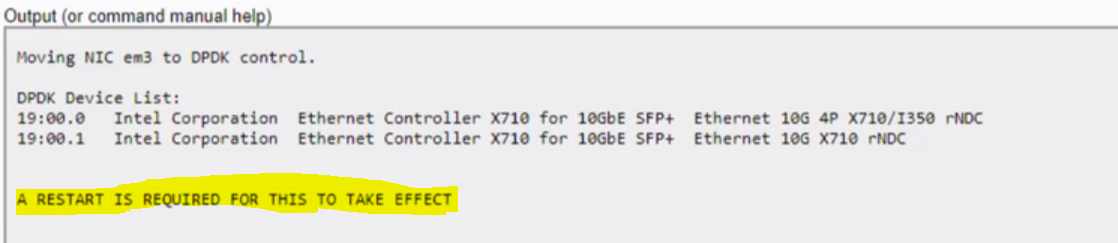
7. (Optional) Navigate to Admin -> Services -> #DecoderName# -> View -> Explore. Expand /decoder/devices/. Rightclick on the properties.
From the drop-down select prune. Click Send

Note :With prune, any associated interfaces - with PFRINGZC would be removed from the relevant /decoder/devices/ folders. Pfringc folder will not be shown on the selectable interface option
For more information follow the steps shared in the link to replace it with DPDK
(Optional) Data Plane Development Kit Packet Capture - NetWitness Community - 669132
For Multiple adapter configuration, follow the steps given in the below link
https://community.netwitness.com/t5/netwitness-platform-online/optional-data-plane-development-kit-packet-capture/ta-p/669132#Manually
If you run into any issues while performing the above steps Open a Netwitness support case.
https://community.netwitness.com/t5/netwitness-platform-online/optional-data-plane-development-kit-packet-capture/ta-p/669132#Manually
If you run into any issues while performing the above steps Open a Netwitness support case.
Notes
For multiple adapters:Use /decoder/devices/interfaces in Explore View to get the interface numbers, and then you can use /decoder?msg=select&adapter=#,# for two or #,#,# for three.
Product Details
RSA Product Set: NetWitness Platform
RSA Product/Service Type: nw-upgarde-precheck tool
RSA Version/Condition: 12.4
Approval Reviewer Queue
Technical approval queue