.png?width=180&height=32&name=NW%20Logo%20(2).png)
Issue
Warehouse Connector stream does not start after service password changeWhen trying to use the Explorer view to change the Warehouse Connector Stream source password under /warehouseconnector/sources/{IP Address}:56002/config -> Password, receive following error.
Cause
All the account service passwords are changed on a regular basis and as a result of this change, it caused the Streams to fail on startup.
Resolution
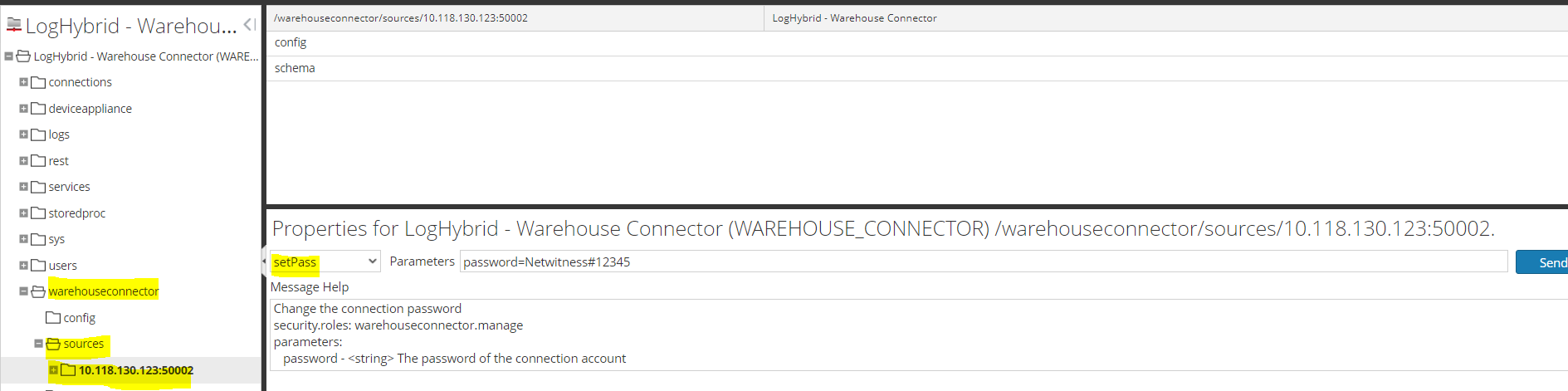
The resolution to this problem is to perform the following:- Navigate to Warehouse Connector -> Explore view through the UI.
- Go to the warehouseconnector node and then to the sources node.
- Right click on the source node, 10.118.130.123:50002 in this example, and click on Properties.
- Select 'setPass' from the drop down property list, supply the password parameter with the password.
- Click Send.
Product Details
RSA Product Set: NetwitnessRSA Product/Service Type: Warehouse Connector
RSA Version/Condition: 11.x, 12.x
Approval Reviewer Queue
Technical approval queue