.png?width=180&height=32&name=NW%20Logo%20(2).png)
New Health & Wellness Tab New Health & Wellness Tab
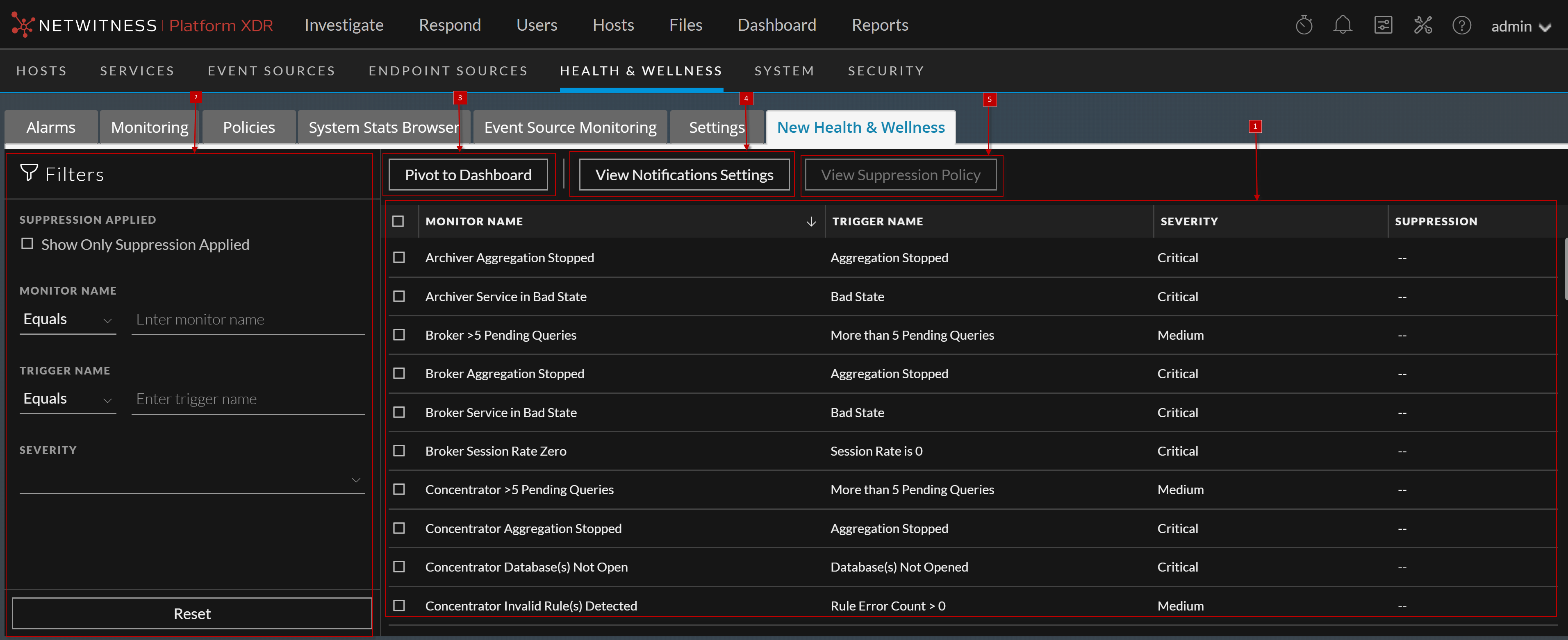
In New Health & Wellness tab, you can filter alerts (monitors) and add the notifications which sends a notification message when an alert is triggered, suppress the notification for a time period and pivot to New Health and Wellness dashboards.
To access this view:
- Go to
 (Admin) > Health & Wellness.
 - Click the New Health & Wellness tab.
The figure depicts the New Health & Wellness view.
What do you want to do?What do you want to do?
- Role: Administrator
- I want to ...: Manage Notification
- Show me how: Manage Notification and Suppression
- Role: Administrator
- I want to ...: Manage Suppression
- Show me how: Manage Notification and Suppression
Related TopicsRelated Topics
Quick LookQuick Look
- Column 1: 1
- Column 2:
Notification Panel: You can view the list of alerts (monitors) along with the trigger name, severity and suppression.
Monitor Name - Name of the monitor.
Trigger Name - Name of the trigger.
Severity - Severity assigned to the alert. The options are Critical, High, Medium, and Low.
Suppression - Indicates whether suppression policy is applied or not. Green tick indicates suppression policy is applied.
- Column 1: 2
- Column 2: Filters Alerts. You can filter alerts on Suppression Applied, Monitor Name, Trigger Name, and Severity. To reset filters, click Reset.
- Column 1: 3
- Column 2:
Pivot to Dashboard. You can view New Health and Wellness Dashboards. For more information, see Accessing New Health and Wellness Dashboards.
- Column 1: 4
- Column 2:
View Notification Settings. You can define notification settings which sends a notification message when an alert is triggered. For more information, see Adding Alert Notifications.
- Column 1: 5
- Column 2: View Suppression Policy. You can suppress notifications for a time period by specifying a suppression policy. For more information, see Suppressing Notifications.