.png?width=180&height=32&name=NW%20Logo%20(2).png)
Issue
When attempting to install NetWitness Platform version 12.4.0.0 using the rsa-nw-12.4.0.0.20806.iso on a virtual machine that was deployed from an OVA file, users may encounter the following error message during thenwsetup-tui process:
This error typically occurs when deploying the ISO onto a virtual machine that was created using an OVA template.
Screenshot of the Error Message: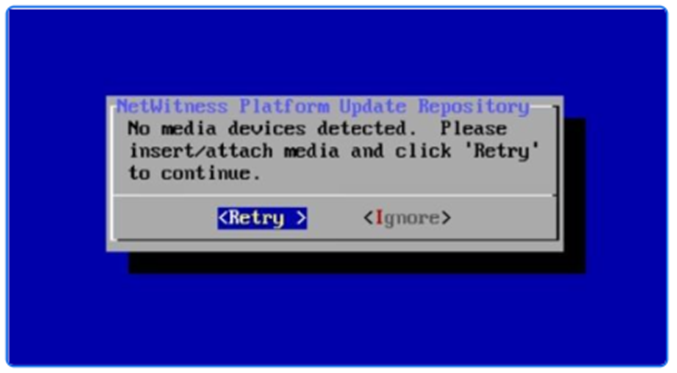
Cause
The error "No media devices detected" arises because the installation scripts (bootstrap and nwsetup-tui) incorrectly identify the media device. The scripts are configured to detect CentOS media devices and fail to recognize the AlmaLinux devices used in version 12.4, leading to the installation failure.
Resolution
To resolve this issue, update the scripts /usr/bin/bootstrap and /usr/bin/nwsetup-tui on the host where the failure is occurring. Follow the steps below to modify the necessary code:
Step-by-Step Instructions
-
Edit
/usr/bin/bootstrap:Open the file
/usr/bin/bootstrapusing a text editor likevi:vi /usr/bin/bootstrapUpdate the following lines of code:
Previous Code:
cp -a "$mountPoint/Packages/"* "$NW_REPO_LOCAL_BASE/"
local blockDeviceDetect=$(blkid | grep '"OEMDRV"\|"CentOS 7 x86_64"')
local blockDeviceCount=$(blkid | grep -c '"OEMDRV"\|"CentOS 7 x86_64"')
elif [[ "${blockDeviceDetect}" == *"CentOS 7 x86_64"* ]]; then
Workaround:
cp -a "$mountPoint/Minimal/Packages/"* "$NW_REPO_LOCAL_BASE/"
local blockDeviceDetect=$(blkid | grep '"OEMDRV"\|"AlmaLinux-8-9-x86_64-dvd"')
local blockDeviceCount=$(blkid | grep -c '"OEMDRV"\|"AlmaLinux-8-9-x86_64-dvd"')
elif [[ "${blockDeviceDetect}" == *"AlmaLinux-8-9-x86_64-dvd"* ]]; then
2. Edit
/usr/bin/nwsetup-tui:Open the file
/usr/bin/nwsetup-tuiusing a text editor likevi:vi /usr/bin/nwsetup-tui
Update the following lines of code:
Previous Code:
if [ "$(blkid | grep -ci '"OEMDRV"\|"CentOS')" -gt 0 ]; then
Workaround:
if [ "$(blkid | grep -ci '"OEMDRV"\|"Alma')" -gt 0 ]; then
Notes
- Ensure you have the necessary permissions to edit these files.
- Always make a backup of the original files before making any changes.
- After making these changes, re-run the
nwsetup-tuicommand to continue the deployment process.
Product Details
NetWitness Product Set: NetWitness PlatformNetWitness Product/Service Type: All nodes
NetWitness Version/Condition: 12.4
Platform: AlmaOS
Approval Reviewer Queue
Technical approval queue