.png?width=180&height=32&name=NW%20Logo%20(2).png)
Issue
When ODBC event source configured and test connection successful with How to test an ODBC connection from a Log Collector in RSA Security Analytics/NetWitness Platform, The logs show odbc events being published as below./var/log/messages:
Oct 25 09:33:53 LogDecoder NwLogCollector[271640]: [LogdecoderProcessor] [info] [queue.odbc] [processing] [Receiver WorkUnit] [processing] LogDecoderProcessorWorkUnit completed.
Published 112 events in 4 messages (average 2394 bytes/message) from queue LogDecoder.logdecoder.odbc at location 127.0.0.1:5671. Processing was aborted: N0
However, Investigate->Navigate with device.ip=
Tasks
Logs must be coming to Investigate->Navigate page with multiple ip details in device.ip. But, not with original device.ip.
Resolution
Follow the below steps to get Original event source ip in device.ip meta key.- Login to NetWitness GUI and go to LC->explore->logcollection->odbc->eventsources and click '+' to expand.
- Select Event Source and Change use_event_source_address value from false to true as below.
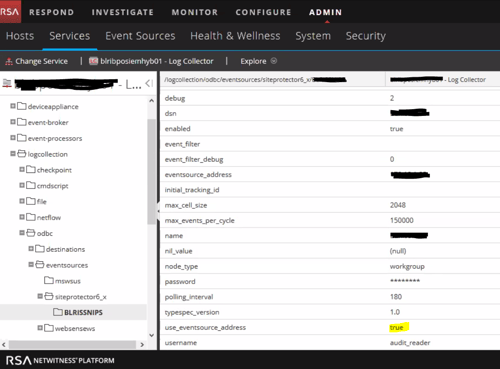
- Login to Collector putty to restart collector service using the below command.
systemctl restart nwlogcollector
- Verify Investigate->Navigate with device.ip=
. This must show events now.
Product Details
RSA Product Set: NetWitness PlatformRSA Product/Service Type: Core Appliance
RSA Version/Condition: 11.2.0.0
Platform: CentOS
O/S Version: 7
Summary
This document outlines the procedure to get original event source ip in device.ip meta key.
Approval Reviewer Queue
RSA NetWitness Suite Approval Queue