.png?width=180&height=32&name=NW%20Logo%20(2).png)
Issue
The error message below occurs when going to the Config tab of a Remote Collector.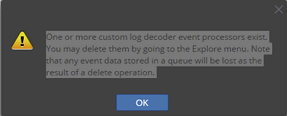
The error below is logged when deleting the queues using the following knowledge article: At least one VLC queue exists that does not have any consumers in RSA Security Analytics
[LogdecoderProcessor] [failure] [queue.checkpoint] [processing] [Receiver WorkUnit] [processing] LogDecoder processor error from queue LogDecoder.SG_HK.checkpoint at location 127.0.0.1:5671. Reason: Consumer was cancelled: amq.ctag-dTKvrwnUsqdo0ipZS2imCw Jun 3 05:49:25 srahkgsav99 NwLogCollector[11070]: [LogdecoderProcessor] [failure] [queue.checkpoint] [processing] [Receiver WorkUnit] [processing failure] srxhkrsalh01-LogDecoder:WrkUnit[11] Processing failed
In addition, you can see two queues for each collection with active consumers, which can be verified by issuing the command below on the VLC.
The error can also occur when switching a VLC type from "LC" to "RC", and there is some remaining Local Collector configuration.
For more information refer to the following knowledge article: RSA Security Analytics syslog option is missing on a virtual log collector (VLC) in version 10.6
Cause
A possible cause is due to a manual adding of a secondary event processor to forward logs out to a non-SA system.This can be confirmed in the RSA Security Analytics UI by navigating to Services > VLC > Explore view > Event Processor.
Resolution
How to delete the customized event-processor from explore view of remote collector
- In the RSA Security Analytics UI, navigate to Administration -> Devices, select the VLC device, and click on View > Explore.
- Right-click on Event-Processor and select Properties.
- From the drop down box on properties window, select Remove.
- In Parameters, enter: name="{somename}" and click Send. (Where {somename} is the rabbitmq queue name to be deleted.)
- See the output from the "rabbitmqctl list_queues -p logcollection consumers name messages" command.
- ResponseOutput will show "Success".
- Restart rabbitmq service on Remote collector using the command below.
service rabbitmq-server restart
This will automatically delete the unwanted queues and will start processing the messages to the local collector.
Product Details
RSA Product Set:- Security AnalyticsRSA Product/Service Type:- Remote log collector,Log Decoder, Local Collector
RSA Version/Condition:10.6.x
Platform: CentOS
Approval Reviewer Queue
RSA NetWitness Suite Approval Queue