.png?width=180&height=32&name=NW%20Logo%20(2).png)
Issue
Deployments that are upgraded to 11.7.1.x from 11.6.x.x versions WITHOUT hitting 11.7.0.2, will face failure while attempting to Orchestrate newer appliances that are imaged with the 11.7.0.2 ISO due to missing 11.7.0.2 repository structure on the head node.Cause
1. Install an Env with any 11.6 or lower version and upgrade it to 11.7.1 or higher.
2. Add a new node-X with 11.7.0.2 iso.
3. While executing nwsetup-tui on the new node, you encounter an error like this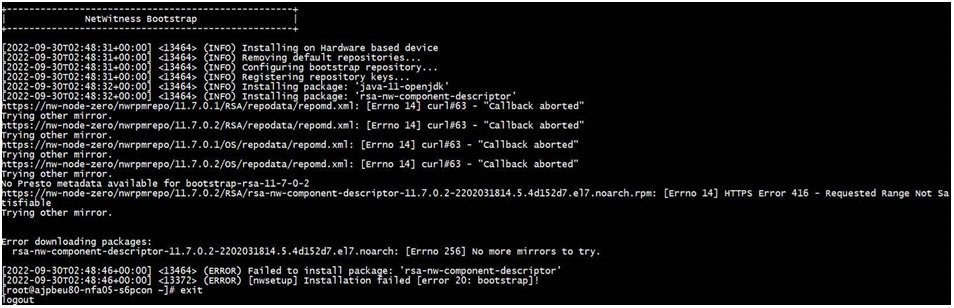
4. Upload the upgrade zip files for version 11.7.0.2 to /var/netwitness/common/update-stage folder on Node-0
5. Go to the UI and click on check for updates.
6. An error appears on the UI Admin->Hosts->Updates and Click on Check for Updates.
This error is expected and is an additional check in the UI to alert the Customer that they are already on a higher version and Initialization is not allowed.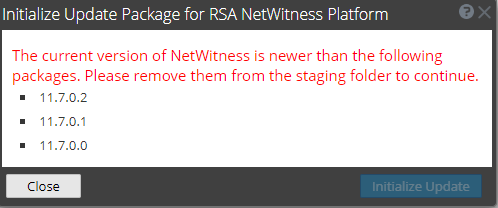
Resolution
When you run into an issue like this, the Orchestration - Initialization needs to be done from Offline-CLI Mode and the below steps can be followed.
1. Cleanup the folder /var/netwitness/common/update-stage of any older versions (if any).
2. Download the upgrade zip files of the intermediate versions required along with the version of the iso
of the new Node-X to /var/netwitness/common/update-stage.
e.g If your old environment was 11.6.0.0 and you have upgraded to 11.7.1.2 on Node-O and are trying to install new node with 11.7.0.2 iso -
a. You might see old folders/zip files in /var/netwitness/common/update-stage which can be
removed.
b. Download the upgrade zips for netwitness-11.7.0.0.zip netwitness-11.7.0.1.zip
netwitness-11.7.0.2.zip
3. Create a new-stage folder /tmp/upgrade and then unzip all the upgrade zips. Below commands will be helpful.
mkdir /tmp/upgrade/11.7.0.0/
mkdir /tmp/upgrade/11.7.0.1/
mkdir /tmp/upgrade/11.7.0.2/
unzip /var/netwitness/common/update-stage/netwitness-11.7.0.0.zip -d /tmp/upgrade/11.7.0.0/
unzip /var/netwitness/common/update-stage/netwitness-11.7.0.1.zip -d /tmp/upgrade/11.7.0.1/
unzip /var/netwitness/common/update-stage/netwitness-11.7.0.2.zip -d /tmp/upgrade/11.7.0.2/
4. Initialize the version using command.
upgrade-cli-client --init --version 11.7.0.2 --stage-dir /tmp/upgrade/
5. Then execute command nwsetup-tui on the new node.
Product Details
RSA Product Set: NetWitness PlatformRSA Product/Service Type: Admin Server & Orchestration
RSA Version/Condition: 11.6 or lower and upgrade to 11.7.x above
Approval Reviewer Queue
Technical approval queue