.png?width=180&height=32&name=NW%20Logo%20(2).png)
Out-of-Compliance ReferenceOut-of-Compliance Reference
This topic describes the workflow when your license is out of compliance.
Workflow
This workflow illustrates the end-to-end licensing process.
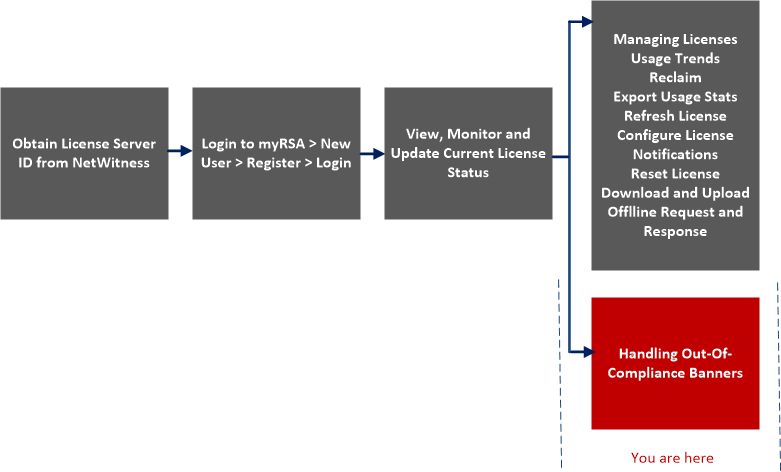
What do you want to do?
*You can perform this task here.
Note: When throughput devices are under trial period, warning messages will not be displayed unless usage is observed on the corresponding device.
Out-of-Compliance State
The following sample banner is displayed when a license expires:

If your license has internal errors, the following banner is displayed:

In addition to a red banner being displayed during system log on, an Out of Compliance Acknowledgment dialog is also displayed. Click Accept to continue using your NetWitness product.
Licenses may become out-of-compliance due to reasons provided in the following table:
Note: If a license has not been installed within 90 days, you must contact Sales to purchase a NetWitness license.
License Approaching Out-of-Compliance
When your license is approaching expiration, or it is nearing its allotted usage, a yellow banner with a brief description is displayed. A yellow banner is displayed 14 days before your license is due to expire. You will also see a yellow banner if you are approaching your allotted license usage. You can get rid of the yellow banner by clicking the Dismiss button.
The following sample banner is displayed in the NetWitness screen if your license is approaching its allotted usage:

The following table explains the messages that are displayed when you see a yellow banner.