.png?width=180&height=32&name=NW%20Logo%20(2).png)
Issue
As per the compliance process of the customer, they need to change the password for UEBA data source.Customer needs to have a detailed procedure on how to change the service user account created and have it updated on UEBA.
Tasks
- Change the password of the service account created under Broker or Concentrator (data source service).
- Update the service account password on UEBA host
Resolution
- Change the password of the service account created under Broker or Concentrator (data source service).
You can achieve this by following this article https://community.rsa.com/docs/DOC-84857 - Update the configuration parameters of the UEBA is to use the /opt/rsa/saTools/bin/ueba-server-config
- SSH to the UEBA host
- Run the following commands
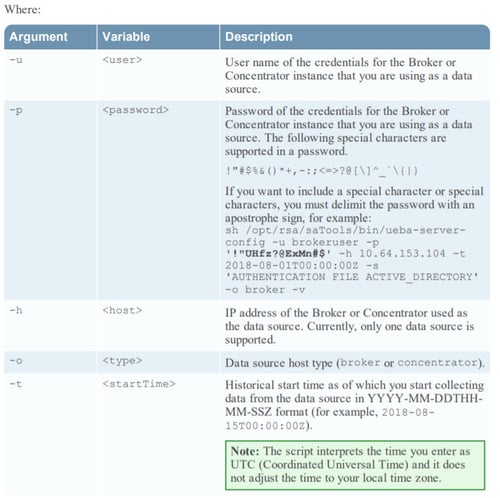
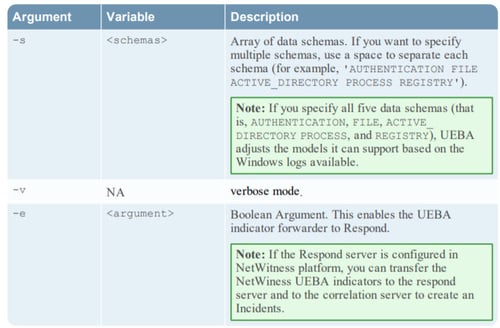
/opt/rsa/saTools/bin/ueba-server-config -u <user> -p <password> -h
<host> -o <type> -t <startTime> -s <schemas> -v -e <argument>
<host> -o <type> -t <startTime> -s <schemas> -v -e <argument>
Notes
Product Details
RSA Product Set: NetWitness Logs & NetworkRSA Product/Service Type: Core Appliance, UEBA
RSA Version/Condition: 11.X
Platform: CentOS
Approval Reviewer Queue
RSA NetWitness Suite Approval Queue