.png?width=180&height=32&name=NW%20Logo%20(2).png)
Provision Local Collectors and Remote CollectorsProvision Local Collectors and Remote Collectors
The NetWitness server verifies if an appliance has a Log Decoder service. If there is a Log Decoder service, it becomes a Local Collector. If a Log Decoder service is missing, it becomes a Remote Collector. A local Log Collector has an Event Destination and by default goes to the Local Log Decoder service. A Remote Collector does not have an Event Destination. The NetWitness Server identifies a Legacy Windows Collector as a Remote Collector.
To edit a Local Collector or Remote Collector:
- Go to
 (Admin) > Services.
 - Select a Log Collector service.
-
In the Services view, select
 in the toolbar.
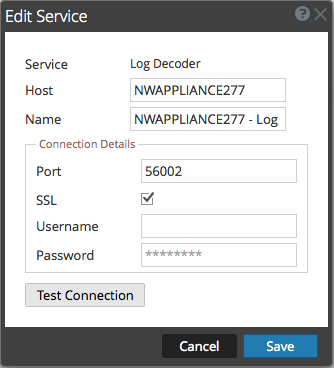
The Edit Service dialog is displayed.
-
In the Edit Service dialog, provide the following information.
- Click Test Connection to determine if NetWitness connects to the service.
-
When the result is successful, click Save.
If the test is unsuccessful, edit the service information and retry.