Query Dialog
Query DialogQuery Dialog
In the Navigate view or Legacy Events view, you can create a query rather than clicking through the meta keys and values to drill down into the meta data. The dialogs for creating a query offer syntax help with drop-down lists of applicable meta keys and operators. To access this dialog in the Navigate or Legacy Events view toolbar, select Query.
What do you want to do?What do you want to do?
- User Role:
Incident Responder or Threat Hunter
- I want to ...:
review detections and signals seen in my environment
- Show me how:
NetWitness Platform Getting Started Guide
- User Role: Incident Responder
- I want to ...:
review critical incidents or alerts
- Show me how:
NetWitness Respond User Guide
- User Role: Threat Hunter
- I want to ...: query a service, metadata, and time range*
- Show me how:
Begin an Investigation in the Events View
Begin an Investigation in the Navigate or Legacy Events View
- User Role: Threat Hunter
- I want to ...:
view metadata
- Show me how:
- User Role: Threat Hunter
- I want to ...:
view sequential events
- Show me how:
- User Role:
Threat Hunter
- I want to ...:
reconstruct and analyze an event
- Show me how:
- User Role: Threat Hunter
- I want to ...: examine files and associated hosts
- Show me how:
Download Data in the Events View
- User Role: Threat Hunter
- I want to ...: perform lookups
- Show me how:
- User Role: Threat Hunter
- I want to ...: create an incident or add to an incident
- Show me how:
- User Role:
Threat Hunter
- I want to ...:
add a meta value to a Context Hub list
- Show me how:
*You can perform this task in the current view.
Related TopicsRelated Topics
Quick LookQuick Look
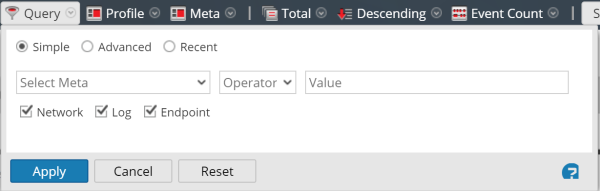
The Query dialog has three views:
- Simple
- Advanced
- Recent
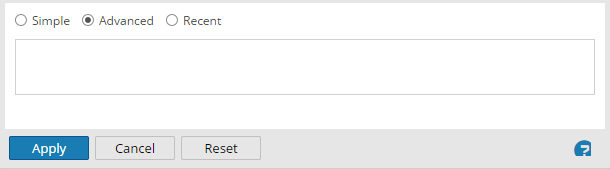
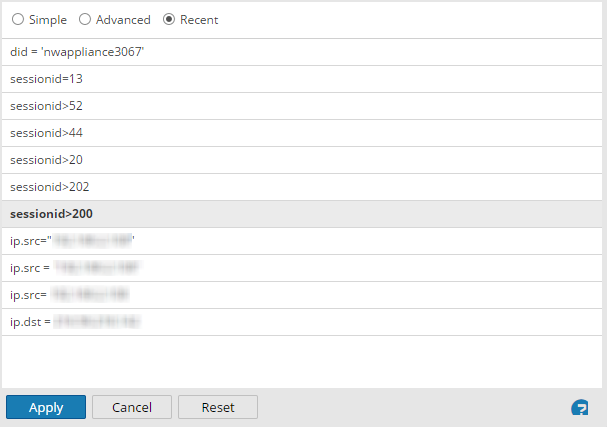
In the Simple view, you can create a query using the options displayed in the dialog. In the Advanced view, you can create a query without guidance. In the Recent view, you can select a query from a drop-down list of recent queries.
Simple ViewSimple View
Advanced ViewAdvanced View
Recent ViewRecent View
The following table describes features of the Query dialogs.
- Feature: Select Meta
- Description: Displays a drop-down list of meta groups.
- Feature: Operator
- Description: Displays a drop-down list of operators (=,NetWitness!=,NetWitnessexists,NetWitness!exists)
- Feature: Value
- Description: Allows you to enter a value to complete the query.
- Feature: Network
- Description: Limits the query to packets if Log is not selected.
- Feature: Log
- Description: Limits the query to logs if Network is not selected.
- Feature: Query box
- Description: Allows you to enter a query in the Advanced view. When you begin typing, a drop-down list of available meta keys for the service is displayed, then a drop-down of operators is displayed as you type. If the expression currently entered in the query box is invalid, a warning appears near the box. When the query is valid, the warning is removed.
- Feature: Query list
- Description: Allows you to select a query from a list of recent queries in the Recent view. Double-clicking a query automatically applies it.
- Feature: Apply
- Description: Applies the new query to the current Investigation view.
- Feature: Cancel
- Description: Closes the dialog without applying changes.
- Feature: Reset
- Description: Resets all fields.