.png?width=180&height=32&name=NW%20Logo%20(2).png)
Issue
Unable to mount filesystem on an NetWitness Appliance and received "can't read superblock" error while mounting.


Cause
Reason of this could be because removing the disk/LUN’s without clean shutdown/unmount or de-attaching disks from LV’s.
Resolution
In order to resolve the issue, follow the steps below:
- Connect to the appliance via SSH as the root user.
- Shutdown the appropriate services with: systemctl stop nwbroker nwappliance nwlogcollector nwlogdecoder nwconcentrator nwdecoder nwarchiver nwwarehouseconnector
- Run nwraidtool.py and confirm that no issues with disks.
- If any faulty disks, submit an RMA and replace.
- cd to "/" to ensure you're not on a mounted volume: cd /
- Issue the following commands if all the disk looks good.
1. Run vgscan and get the affected volume group name.

2. Run lvscan and get the affected logical volume group name and path.

3. Run below commands to deactivate the volume group and logical volume.
# vgchange -an
Example:
# vgchange -an index

# lvchange -an
Example :
# lvchange -an /dev/index/index

4. Run below commands to activate the volume group and logical volume
# vgchange -ay
Example:
# vgchange -ay index

# lvchange -ay
Example :
# lvchange -ay /dev/index/index

4. Run vgscan
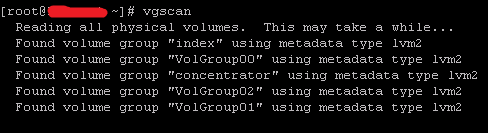
5. Run lvscan

6. Attempt to mount the fixed volumes : mount -a
7. Run "df -h" and confirm the file system mounted on SA Appliances.
6. start the nwdecoder and/or nwconcentrator services with the following command: systemctl start nwbroker nwappliance nwlogcollector nwlogdecoder nwconcentrator nwdecoder nwarchiver nwwarehouseconnector
Product Details
NetWitness Product Set: NetWitness PlatformNetWitness Product/Service Type: All Nodes
NetWitness Version/Condition: 12.x
Platform: CentOS/Alma Linux
Approval Reviewer Queue
Technical approval queue