.png?width=180&height=32&name=NW%20Logo%20(2).png)
Issue
Both internal RAID 1 SSD disks are failed (Slot 12 and Slot 13) in the RSA NetWitness Series 5 Hybrid appliance.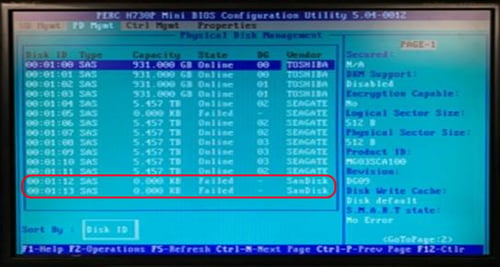
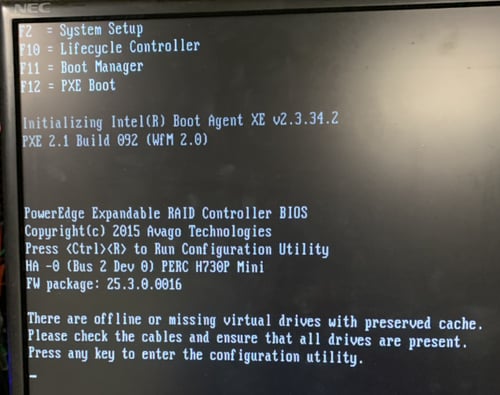
The /var/netwitness/concentrator/index mount is unavailable, and the NetWitness Series 5 Hybrid appliance is unable to boot.
Cause
- There is a known issue with SanDisk D417 SSD disks that are used in some NetWitness Series 5 Hybrid appliances where they can prematurely be marked as Bad.
There is a SanDisk D417 SSD firmware update to fix.
- SSD disks have a finite write life.
Can see the remaining SSD write endurance in the NetWitness appliance iDRAC, Overview > Storage > Physical Disks, look at each appliance SSD disk at the field "Remaining Rated Write Endurance" which shows the remaining write endurance of the SSDs.
When it drops to 0% the SSD disk becomes read-only.
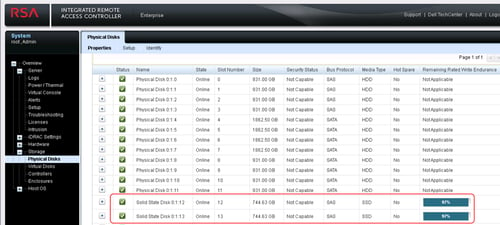
Reference: R730 Remaining Rated Write Endurance 4%
Workaround
Preferred Option - Recover at least one of the two failed SSD SanDisk disks
- Pull and fully re-insert each failed SSD disks (Slot 12 and Slot 13).
- Download a copy of the new SanDisk D417 firmware.
Reference: RSA NetWitness Availability of BIOS & iDRAC Firmware Updates
Follow the link for SanDisk D417 for the model number(s) ..., under Series 5 to download the new SanDisk D417 firmware version, which is a Windows 64-bit .exe program that can be loaded via the appliance iDRAC.
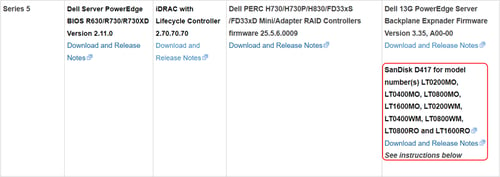
Try to update the SanDisk D417 firmware via the iDRAC, Overview > iDRAC Settings > Update and Rollback, choose the update SanDisk firmware Windows 64-bit .exe program and run it to update the firmware.
Reference: How to upgrade the iDRAC firmware through the web interface on RSA NetWitness Platform appliances
- If at least one previously failed SSD can be recovered, then reboot the appliance and confirm the Concentrator index mount (/var/netwitness/concentrator/index) is recovered.
- RMA replaces any SSD that remains in a Bad state.
Resolution
Option after RMA replacing both SSD disks and need to manually recreate the NetWitness /var/netwitness/concentrator/index mount
After replacing both SSD disks the RAID 1 configuration for the NetWitness /var/netwitness/concentrator/index mount is lost and needs to be manually recreated.
- If the NetWitness appliance will not boot due to a Foreign configuration discovered.
Choosing the option to import the Foreign configuration will likely create 2 separate Virtual Disks (VD4 & VD5) for the two new SSDs then boot into Single User Mode.
Reference: Boot RSA NetWitness Platform 11.x appliance into Single User Mode
- Comment out the /var/netwitness/concentrator/index mount from the /etc/fstab file with the vi editor.
For example:[root@hybrid ~]# grep concentrator/index /etc/fstab
#/dev/mapper/VolGroup04-concinde /var/netwitness/concentrator/index xfs noatime,nosuid 1 2 - Show all Virtual Disks and confirm that both SSD disks are found.
/opt/MegaRAID/perccli/perccli64 /c0/vall show
For example:[root@hybrid ~]# /opt/MegaRAID/perccli/perccli64 /c0/vall show
Controller = 0
Status = Success
Description = None
Virtual Drives :
==============
---------------------------------------------------------------
DG/VD TYPE State Access Consist Cache Cac sCC Size Name
---------------------------------------------------------------
0/0 RAID1 Optl RW Yes RFWBC - OFF 931.0 GB
1/1 RAID1 Optl RW Yes RFWBC - OFF 931.0 GB
2/2 RAID5 Optl RW Yes RFWBC - OFF 5.456 TB
3/3 RAID5 Optl RW Yes RFWBC - OFF 2.727 TB
4/4 RAID0 Optl RW Yes RFWBC - OFF 744.625 GB
5/5 RAID0 Optl RW Yes RFWBC - OFF 744.625 GB
---------------------------------------------------------------
Cac=CacheCade|Rec=Recovery|OfLn=OffLine|Pdgd=Partially Degraded|Dgrd=Degraded
Optl=Optimal|RO=Read Only|RW=Read Write|HD=Hidden|TRANS=TransportReady|B=Blocked|
Consist=Consistent|R=Read Ahead Always|NR=No Read Ahead|WB=WriteBack|
FWB=Force WriteBack|WT=WriteThrough|C=Cached IO|D=Direct IO|sCC=Scheduled
Check Consistency - If VD4 & VD5 exist for the two new 744.625 GB SSDs, then delete both.
/opt/MegaRAID/perccli/perccli64 /c0/v5 delete
/opt/MegaRAID/perccli/perccli64 /c0/v4 delete
- Import any foreign configuration disks, or confirm that there aren’t any.
/opt/MegaRAID/perccli/perccli64 /c0/fall import
For example:[root@hybrid ~]# /opt/MegaRAID/perccli/perccli64 /c0/fall import
Controller = 0
Status = Success
Description = Couldn't find any foreign Configuration - Re-create the RAID1 group with the two new SSDs.
/opt/MegaRAID/perccli/perccli64 /c0 add vd r1 drives=32:12,32:13 wb ra cached Strip=128
For example:[root@hybrid ~]# /opt/MegaRAID/perccli/perccli64 /c0 add vd r1 drives=32:12,32:13 wb ra cached Strip=128
Controller = 0
Status = Success
Description = Add VD Succeeded - Check that the "sde" disk (744.6G) exists for the SSDs, and it currently has no mounts.
lsblk
For example:[root@hybrid ~]# lsblk
NAME MAJ:MIN RM SIZE RO TYPE MOUNTPOINT
sda 8:0 0 931G 0 disk
├─sda1 8:1 0 1M 0 part
├─sda2 8:2 0 930.5G 0 part
│ ├─netwitness_vg00-root 253:0 0 29.3G 0 lvm /
│ ├─netwitness_vg00-swap 253:1 0 4G 0 lvm [SWAP]
│ ├─netwitness_vg00-nwhome 253:7 0 486.5G 0 lvm /var/netwitness
│ ├─netwitness_vg00-warec 253:8 0 390.6G 0 lvm /var/netwitness/warehouseconnector
│ ├─netwitness_vg00-varlog 253:9 0 10G 0 lvm /var/log
│ └─netwitness_vg00-usrhome 253:10 0 10G 0 lvm /home
└─sda3 8:3 0 519M 0 part /boot
sdb 8:16 0 931G 0 disk
└─sdb1 8:17 0 931G 0 part
└─VolGroup01-decometa 253:6 0 931G 0 lvm /var/netwitness/decoder/metadb
sdc 8:32 0 16.4T 0 disk
└─sdc1 8:33 0 16.4T 0 part
├─VolGroup02-decoroot 253:2 0 30G 0 lvm /var/netwitness/decoder
├─VolGroup02-decoinde 253:3 0 30G 0 lvm /var/netwitness/decoder/index
├─VolGroup02-decosess 253:4 0 100G 0 lvm /var/netwitness/decoder/sessiondb
└─VolGroup02-decopack 253:5 0 16.2T 0 lvm /var/netwitness/decoder/packetdb
sdd 8:48 0 10.9T 0 disk
└─sdd1 8:49 0 10.9T 0 part
├─VolGroup03-concroot 253:11 0 30G 0 lvm /var/netwitness/concentrator
├─VolGroup03-concsess 253:12 0 1T 0 lvm /var/netwitness/concentrator/sessiondb
└─VolGroup03-concmeta 253:13 0 9.9T 0 lvm /var/netwitness/concentrator/metadb
sde 8:64 0 744.6G 0 disk - Create a new Physical Volume on the "sde" disk and confirm.
pvcreate /dev/sde
pvscan
For example:[root@hybrid ~]# pvcreate /dev/sde
WARNING: dos signature detected on /dev/sde at offset 510. Wipe it? [y/n]: y
Wiping dos signature on /dev/sde.
Physical volume "/dev/sde" successfully created.
[root@hybrid ~]# pvscan
PV /dev/sdd1 VG VolGroup03 lvm2 [<10.92 TiB / 0 free]
PV /dev/sda2 VG netwitness_vg00 lvm2 [<930.47 GiB / 0 free]
PV /dev/sdc1 VG VolGroup02 lvm2 [16.37 TiB / 0 free]
PV /dev/sdb1 VG VolGroup01 lvm2 [<930.97 GiB / 0 free]
PV /dev/sde lvm2 [744.62 GiB]
Total: 5 [29.83 TiB] / in use: 4 [<29.11 TiB] / in no VG: 1 [744.62 GiB] - Create Volume Group "VolGroup4" on the new "sde" disk.
vgcreate VolGroup04 /dev/sde
vgscan
For example:[root@hybrid ~]# vgcreate VolGroup04 /dev/sde
Volume group "VolGroup04" successfully created
[root@hybrid ~]# vgscan
Reading volume groups from cache.
Found volume group "VolGroup03" using metadata type lvm2
Found volume group "VolGroup04" using metadata type lvm2
Found volume group "netwitness_vg00" using metadata type lvm2
Found volume group "VolGroup02" using metadata type lvm2
Found volume group "VolGroup01" using metadata type lvm2 - Create a Logical Volume on the new Volume Group.
lvcreate -y -n concinde -l 100%FREE VolGroup04
lvscan
For example:[root@hybrid ~]# lvcreate -y -n concinde -l 100%FREE VolGroup04
Wiping ntfs signature on /dev/VolGroup04/concinde.
Logical volume "concinde" created.
[root@hybrid ~]# lvscan
ACTIVE '/dev/VolGroup03/concroot' [30.00 GiB] inherit
ACTIVE '/dev/VolGroup03/concsess' [1.00 TiB] inherit
ACTIVE '/dev/VolGroup03/concmeta' [<9.89 TiB] inherit
ACTIVE '/dev/VolGroup04/concinde' [744.62 GiB] inherit
ACTIVE '/dev/netwitness_vg00/nwhome' [486.53 GiB] inherit
ACTIVE '/dev/netwitness_vg00/warec' [390.62 GiB] inherit
ACTIVE '/dev/netwitness_vg00/root' [29.31 GiB] inherit
ACTIVE '/dev/netwitness_vg00/varlog' [10.00 GiB] inherit
ACTIVE '/dev/netwitness_vg00/usrhome' [10.00 GiB] inherit
ACTIVE '/dev/netwitness_vg00/swap' [4.00 GiB] inherit
ACTIVE '/dev/VolGroup02/decoroot' [30.00 GiB] inherit
ACTIVE '/dev/VolGroup02/decoinde' [30.00 GiB] inherit
ACTIVE '/dev/VolGroup02/decosess' [100.00 GiB] inherit
ACTIVE '/dev/VolGroup02/decopack' [<16.22 TiB] inherit
ACTIVE '/dev/VolGroup01/decometa' [<930.97 GiB] inherit - Make an xfs file system on the Logical Volume.
mkfs.xfs /dev/VolGroup04/concinde
For example:[root@hybrid ~]# mkfs.xfs /dev/VolGroup04/concinde
meta-data=/dev/VolGroup04/concinde isize=512 agcount=4, agsize=48799488 blks
= sectsz=512 attr=2, projid32bit=1
= crc=1 finobt=0, sparse=0
data = bsize=4096 blocks=195197952, imaxpct=25
= sunit=0 swidth=0 blks
naming =version 2 bsize=4096 ascii-ci=0 ftype=1
log =internal log bsize=4096 blocks=95311, version=2
= sectsz=512 sunit=0 blks, lazy-count=1
realtime =none extsz=4096 blocks=0, rtextents=0 - If any managed-values-* directories exist under the current /var/netwitness/concentrator/index directory, move them away.
Otherwise, these directories and files will be hidden behind the new "/var/netwitness/concentrator/index" mount, causing lost disk space.
For example:[root@hybrid ~]# du -sh /var/netwitness/concentrator/index
159M /var/netwitness/concentrator/index
[root@hybrid ~]# mv /var/netwitness/concentrator/index /var/netwitness/concentrator/index.old
[root@hybrid ~]# mkdir -p /var/netwitness/concentrator/index - Un-comment the “/var/netwitness/concentrator/index” mount from the /etc/fstab file with the vi editor.
For example:[root@hybrid ~]# grep concentrator/index /etc/fstab
/dev/mapper/VolGroup04-concinde /var/netwitness/concentrator/index xfs noatime,nosuid 1 2 - Mount the re-built Concentrator index mount.
mount -a
- Confirm that the /var/netwitness/concentrator/index mount exists.
df -hP
For example:[root@hybrid ~]# df -hP
Filesystem Size Used Avail Use% Mounted on
/dev/mapper/netwitness_vg00-root 30G 3.4G 26G 12% /
devtmpfs 63G 0 63G 0% /dev
tmpfs 63G 12K 63G 1% /dev/shm
tmpfs 63G 18M 63G 1% /run
tmpfs 63G 0 63G 0% /sys/fs/cgroup
/dev/sda3 516M 128M 389M 25% /boot
/dev/mapper/netwitness_vg00-varlog 10G 3.4G 6.7G 34% /var/log
/dev/mapper/netwitness_vg00-nwhome 487G 4.2G 483G 1% /var/netwitness
/dev/mapper/VolGroup03-concroot 30G 30G 20K 100% /var/netwitness/concentrator
/dev/mapper/VolGroup02-decoroot 30G 2.9G 28G 10% /var/netwitness/decoder
/dev/mapper/VolGroup03-concsess 1.0T 972G 52G 95% /var/netwitness/concentrator/sessiondb
/dev/mapper/VolGroup03-concmeta 9.9T 9.6T 361G 97% /var/netwitness/concentrator/metadb
/dev/mapper/VolGroup02-decoinde 30G 40M 30G 1% /var/netwitness/decoder/index
/dev/mapper/VolGroup02-decosess 100G 95G 5.4G 95% /var/netwitness/decoder/sessiondb
/dev/mapper/VolGroup01-decometa 931G 882G 50G 95% /var/netwitness/decoder/metadb
/dev/mapper/netwitness_vg00-usrhome 10G 33M 10G 1% /home
/dev/mapper/VolGroup02-decopack 17T 16T 834G 95% /var/netwitness/decoder/packetdb
/dev/mapper/netwitness_vg00-warec 391G 33M 391G 1% /var/netwitness/warehouseconnector
tmpfs 13G 0 13G 0% /run/user/0
/dev/mapper/VolGroup04-concinde 745G 33M 745G 1% /var/netwitness/concentrator/index - Reboot the Hybrid appliance and confirm the Concentrator service is running and is writing into the rebuilt Concentrator index mount.
reboot
Product Details
RSA Product Set: RSA NetWitness PlatformRSA Product/Service Type: Core Appliance
RSA Version/Condition: 11.x
Platform: NetWitness Series 5 Hybrid appliance
O/S Version: CentOS 7
Summary
Lost the RSA NetWitness Series 5 Hybrid /var/netwitness/concentrator/index mount after both RAID 1 SSD disks failed. The NetWitness Series 5 Hybrid appliance is unable to boot.
Approval Reviewer Queue
RSA NetWitness Suite Approval Queue