Required Procedures
Live Services Required ProceduresLive Services Required Procedures
The following workflow describes the basic setup into four steps, which you perform individually.
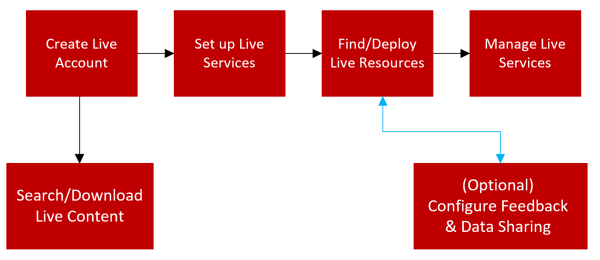
- Configuration Step: Create Live Account
- Description:
Create a Live Account on the Cloud Services Live Registration portal URL: https://live.netwitness.com/registration/.
- Configuration Step: Set Up Live Services on NetWitness Platform XDR
- Description:
Set Up Live Services on NetWitness Platform XDR by configuring a connection with the CMS server.
- Configuration Step: Find and Deploy Live Resources
- Description:
Search and browse for resources in the Live Search view, and then, deploy the selected resources.
- Configuration Step: Manage Live Resources
- Description:
Procedures for administrators to search for, subscribe to, and deploy resources from Live.
- Configuration Step:
Search and Download Content from NetWitness XDR Cloud Services Live
- Description:
Search and browse for content in the Cloud Services Live, and then, download the selected content.
- Configuration Step: NetWitness Feedback and Data Sharing
- Description:
Describes the feedback and data sharing features provided in NetWitness, from Live Services. Participation is optional, but can help to provide useful threat intelligence for the community.