.png?width=180&height=32&name=NW%20Logo%20(2).png)
Issue
Remove netwitness certificate and netwitness backend certificate popup in the UI after successful certificate reissue.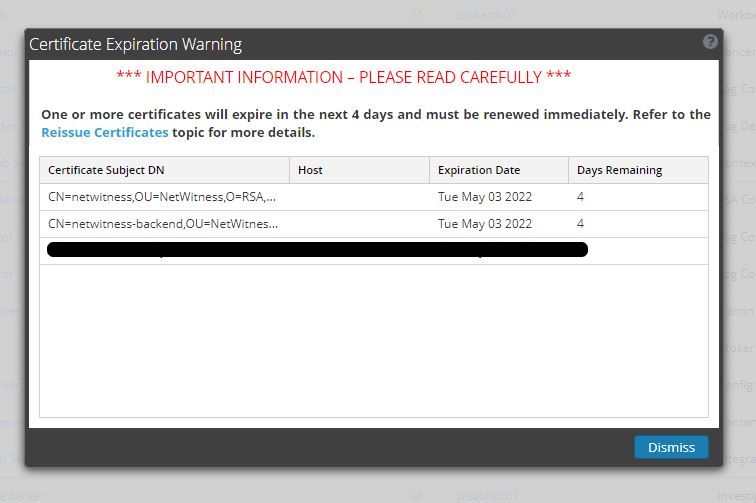
Resolution
1. Execute the following command on the Admin node to confirm if the web certificate has expired or not:
3. If the web certificate has not expired and "netwitness-backend" and "netwitness" shows up in the UI, then execute the following commands on the Admin node to remove "netwitness-backend" and "netwitness" id only from the mongo database after taking a backup of the certificate:
a. Execute the following command to login to the Mongo database.
find /etc/pki/nw/web -type f -name '*.pem' | xargs -i openssl x509 -noout -enddate -in {}
2. If the web certificate has expired, then run
cert-reissue tool once again.
3. If the web certificate has not expired and "netwitness-backend" and "netwitness" shows up in the UI, then execute the following commands on the Admin node to remove "netwitness-backend" and "netwitness" id only from the mongo database after taking a backup of the certificate:
a. Execute the following command to login to the Mongo database.
mongo admin -u deploy_admin -p <deploy_admin_password>
b. After logging into Mongo database, execute the following commands:
c. Restart the jetty service
use security-server
db.certificate.remove({"_id" : "netwitness-backend"})
db.certificate.remove({"_id" : "netwitness"})
exit
db.certificate.remove({"_id" : "netwitness-backend"})
db.certificate.remove({"_id" : "netwitness"})
exit
systemctl restart jetty
Notes
Note: Make sure to take a backup of "netwitness-backend" and "netwitness" certificate in the local drive or copy the output to a backup location.Product Details
RSA Product Set: NetWitness PlatformRSA Product/Service Type: RSA NetWitness Platform
RSA Version/Condition: 11.x
Platform: CentOS
O/S Version: 7
Approval Reviewer Queue
Technical approval queue