.png?width=180&height=32&name=NW%20Logo%20(2).png)
Issue
The user had a standalone Windows Server 2008 Server that isn't in a domain and is using basic authentication. Problem and error message seen when trying to collect logs from that Windows 2008 Server is as below: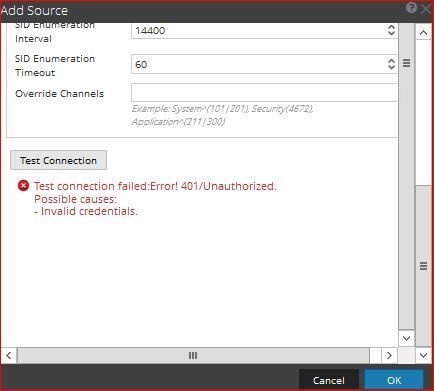
Tasks
Need to confirm that the integration steps were done successfully.- Create a non-Administrator User Account for NetWitness
- Add the User Account to the Event Log Readers Group
- Assign Privileges and Enable Remote Access
- winrm configsddl wmi
- wmimgmt
- Enable Windows Remote Management over HTTP
- winrm quickconfig
- winrm set winrm/config/service/auth '@{Basic="true"}'
- winrm set winrm/config/service '@{AllowUnencrypted="true"}'
- wevtutil gl security & wevtutil sl security /ca:existing-SDDL-string(A;;0x1;;;S-1-5-20)
- Create a new firewall rule to allow WinRM traffic into event sources
- Confirm username and password are correct.
http://sadocs.emc.com/@api/deki/files/43167/MicrosoftWindowsEventing.pdf
One step to confirm is that this computer does indeed allow access from the network. This isn't written in the documents because it is usually enabled by default.
Resolution
On the Windows Server Machine perform the following:- Click Start, point to Programs, point to Administrative Tools, and then click Local Security Policy. This opens the Local Security Settings console.
- In the Local Security Policy, expand Local Policy and click on User Rights Assignment.
- On the right side panel, you will find the Policy name "Access this computer from the network".
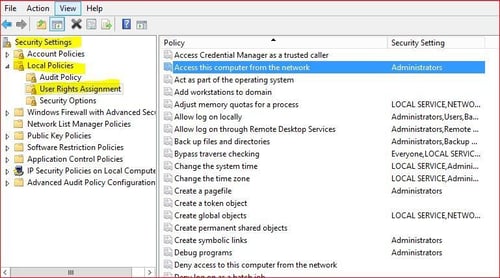
- Confirm that your user/group is allowed in this security setting by double-clicking on the policy. If not, you can add the group right away.
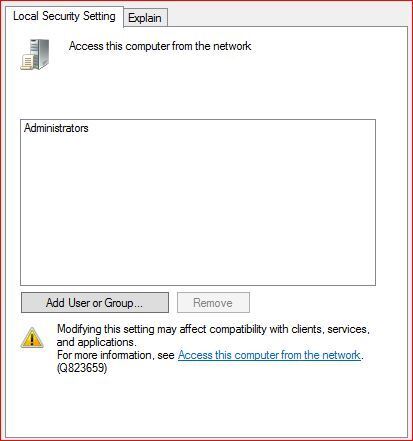
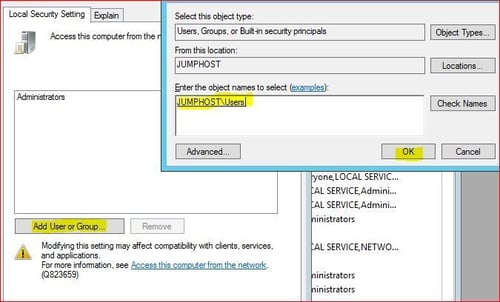
- Adding the group.
Product Details
RSA Product Set: NetWitness Logs and NetworkRSA Version/Condition: 10.5.x, 10.6.x
Approval Reviewer Queue
RSA NetWitness Suite Approval Queue