.png?width=180&height=32&name=NW%20Logo%20(2).png)
Issue
The appliance boot is hanging during "Scanning for devices", trying to find a boot partition.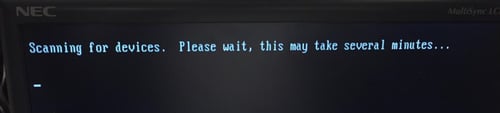
Cause
Either the boot partition is lost, or the appliance is trying to boot from the wrong device.
Resolution
Check if appliance is trying to boot from the wrong device.1. Confirm that there is no DVD or USB inserted into the appliance, as the appliance may be trying to boot from either. Remove/disconnect any DVD or USB from the appliance, and reboot.
2. Check the appliance boot order in the BIOS Boot Settings
Reboot the appliance, and at the BIOS option enter F2 for the BIOS System Setup
The password to enter the bios is rsabios
From the menu, select System BIOS > Integrate Devices
Check if the Internal SD Card Port is On.

If it is On, then it is possible the boot partition is on the SD Card.
If you know the boot partition is not on the SD Card then change the Internal SD Card Port to Off, and Save the change.
Go back the System BIOS Settings and choose Boot Settings > BIOS Boot Settings.
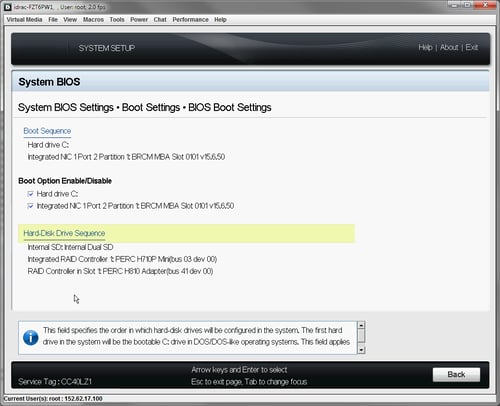
Confirm the Boot Sequence has Hard drive C: before the Integrated NIC.
Confirm the Hard-Drive Disk Sequence has the correct order for the boot partition.
Where "Internal SD: Internal Dual SD" is first if the boot partition is on the SD Cards.
Or "Integrated RAID Controller 1: PERC H710P Mini" is first, if the boot partition is on an internal HDD.
Hit enter on the Hard-Disk Drive Sequence, if you need to change the HDD order, and use the +/- to change to the correct boot device making the correct one the first in the list.
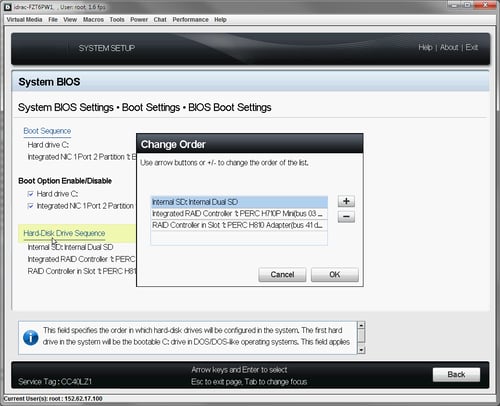
Save any changes and reboot the appliance.
3. If the boot partition is lost then a buildstick re-image of the appliance will be required.
Product Details
RSA Product Set: Security Analytics, NetWitness Log and PacketsRSA Product/Service Type: NetWitness Log and Packets
RSA Version/Condition:10.x
Platform: CentOS
Summary
The appliance boot is hanging during Scanning for devices. Hang at Scanning for devices.
Approval Reviewer Queue
RSA NetWitness Suite Approval Queue