.png?width=180&height=32&name=NW%20Logo%20(2).png)
Issue
Azure log collection fails with the below errors.
Dec 4 12:52:44 LCollector NwLogCollector[6907]: [CmdScriptCollection] [failure] [cmdscript:WrkUnit[2]payloadService:19661] [onLog:800] [azureaudit.AzurePortalLogs] [processing] [WorkUnit] [processing] 2019-12-04T12:52:44Z AzureAuditCollector Azure Resource API call failed with HTTPError, response: {"Code":"BadRequest","Message":"
The start time cannot be more than 90 days in the past."}
Dec 4 16:03:08 LCollector NwLogCollector[6907]: [CmdScriptCollection] [failure] [cmdscript:WrkUnit[1]payloadService:28326] [onLog:800] [azure_ad_signin.AzurePortalAdSignin] [processing] [WorkUnit] [processing] 2019-12-04T16:03:08Z AzureADCollector Azure AD signin API call failed with response: {"error":{"code":"","message":"Specified argument was out of the range of valid values.\r\nParameter name: Minimum allowed time for signinDateTime is 9/2/2019 12:00:00 AM"}}
Dec 4 16:03:08 LCollector NwLogCollector[6907]: [CmdScriptCollection] [failure] [cmdscript:WrkUnit[1]payloadService:28326] [onLog:800] [azure_ad_signin.AzurePortalAdSignin] [processing] [WorkUnit] [processing] 2019-12-04T16:03:08Z AzureADCollector Azure AD signin API call failed with response: {"error":{"code":"","message":"Specified argument was out of the range of valid values.\r\nParameter name: Minimum allowed time for signinDateTime is 9/2/2019 12:00:00 AM"}}
Cause
This issue is due to the old bookmark (last collected time) for logs is beyond 90 days. This can be verified by checking the below files.
cat /var/netwitness/logcollector/runtime/cmdscript/eventsources/azureaudit.AzurePortalLogs.xml
<?xml version="1.0" encoding="utf-8"?>
<type>cmdscript</type>
<uniqueID>azureaudit.AzurePortalLogs</uniqueID>
<referenceName>CmdScriptCollection:azureaudit.AzurePortalLogs</referenceName>
<ptime>2019-Dec-04 16:00:20.677156</ptime>
<WorkUnits>
<#0>
<lastModified> 2018-10-22T21:22:28.1534875Z</lastModified>
<eventDataIds>86d8c37f-b486-40ab-b3b3-1560d2d3b108</eventDataIds>
<timeWindowSize>3840</timeWindowSize>
<WorkUnitStorage_KeyName>AzurePortalLogs</WorkUnitStorage_KeyName>
</#0>
</WorkUnits>
<?xml version="1.0" encoding="utf-8"?>
<type>cmdscript</type>
<uniqueID>azureaudit.AzurePortalLogs</uniqueID>
<referenceName>CmdScriptCollection:azureaudit.AzurePortalLogs</referenceName>
<ptime>2019-Dec-04 16:00:20.677156</ptime>
<WorkUnits>
<#0>
<lastModified> 2018-10-22T21:22:28.1534875Z</lastModified>
<eventDataIds>86d8c37f-b486-40ab-b3b3-1560d2d3b108</eventDataIds>
<timeWindowSize>3840</timeWindowSize>
<WorkUnitStorage_KeyName>AzurePortalLogs</WorkUnitStorage_KeyName>
</#0>
</WorkUnits>
Note: Editing this file would not be recommended.
Resolution
Follow the below steps to get the azure logs again.- Login to NetWitness GUI and go to Logcollector->Config->Event Sources
- Select Plugins from the drop-down and choose Config.
- Select azureaudit in Event Categories and Edit the existing configuration in the Sources page to disable the configuration by clearing Enabled checkbox as below.
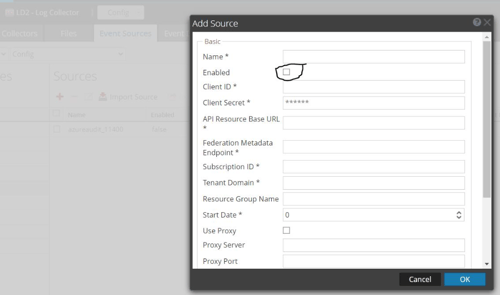
- Re-add the configuration with the new name in Name field and keep all settings as old configuration and do test connection. That should give passed.
Note: Start Date can be <90 days that is maximum value 89.
Note: For Azure ad signin, Start Date can be 0-29. - Verify the latest azure logs by going to Investigate->Navigate page.
Product Details
RSA Product Set: RSA NetWitness PlatformRSA Product/Service Type: Core Appliance
RSA Version/Condition: 11.X
Platform: CentOS
O/S Version: 7
Summary
This document outlines the procedure to start the azure collection which had old bookmarks.
Approval Reviewer Queue
Technical approval queue