.png?width=180&height=32&name=NW%20Logo%20(2).png)
Issue
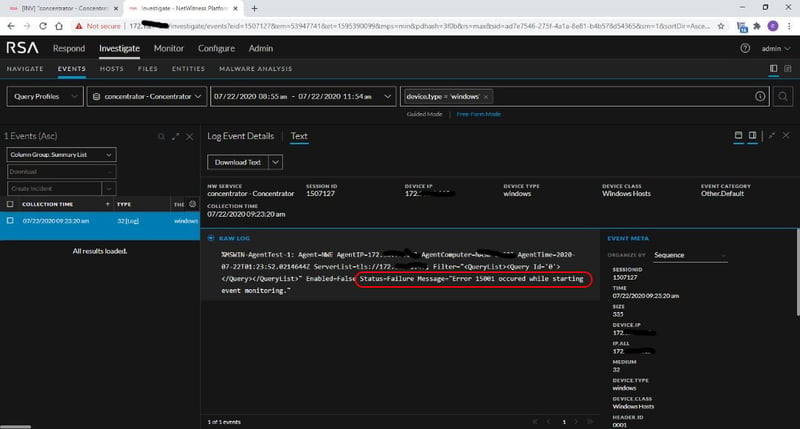
The installed NetWitness Endpoint Agent Windows policy isn't collecting any Windows event logs.The AgentTest event returns the error message "Error 15001 occurred while starting event monitoring."
Cause
Microsoft describes Error 15001 as an invalid channel query.The configured Endpoint Windows policy channel filter has an error or is not configured.
Reference: Microsoft System Error Codes (12000-15999)
Resolution
- In NetWitness UI, Admin > Endpoint Sources, Policies tab
Click on the problem policy for the Windows Event Logs collection.
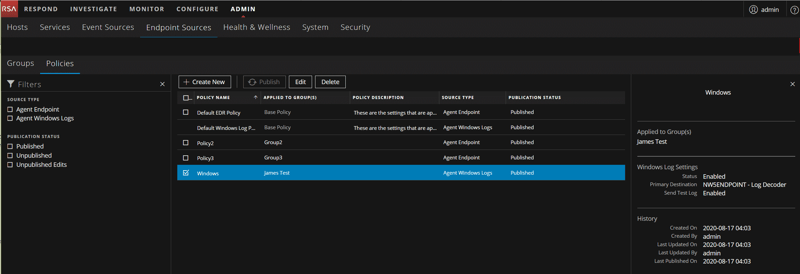
Look to the right at the displayed Channel Filter Settings and try determine if there is an error, or if it is not configured.
The below example shows on the right there is no Windows channel included in the configuration of the "Windows" policy name, which will cause the observed error.
- Edit the Endpoint policy for Windows Event Logs in NW UI, Admin > Endpoint Sources, Policies tab
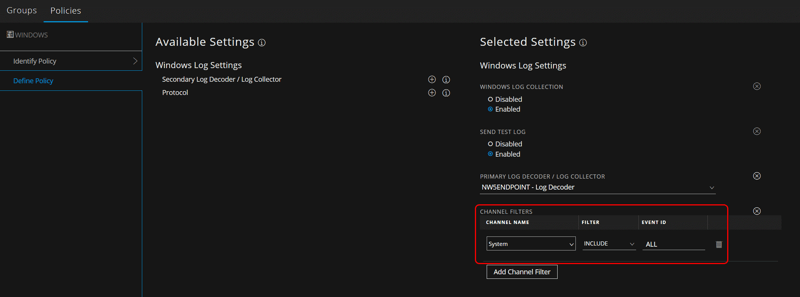
Make sure the "Channel Filters" option is included in the policy, and that at least one channel has been selected.
Publish Policy.
The below example shows on the right the "System" channel has been added to the Windows policy.
Product Details
RSA Product Set: NetWitness PlatformRSA Product/Service Type: Endpoint Advanced Agent
RSA Version/Condition: 11.x, 12.x
Platform: CentOS, AlmaLinux
O/S Version: 7
Product Description: Windows Event Log Collection
Summary
RSA NetWitness Endpoint Agent isn't collecting any Windows logs.
Approval Reviewer Queue
Technical approval queue