.png?width=180&height=32&name=NW%20Logo%20(2).png)
Issue
After running the NetWitness linux sasftpagent.sh script for some time finds there are numerous zombie processes.For example running the "top" command shows a non-zero zombie process count.
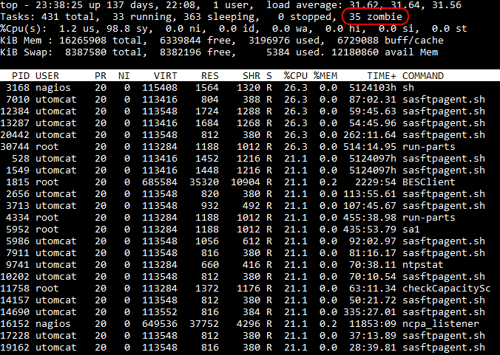
Cause
If the sasftpagent.sh script is scheduled to run too frequently and the logs been collected is large, then the script will not have sufficient time to finish before the run of the script starts.The sasftpagent.sh script will try to kill the previously running instance of the script which may be causing the zombie processes to appear.
The sasftpagent.sh script log indicates that a previously running script tried to be killed, many times and regularly.
For example:
[root@linux ~]#
egrep "found lock|killed PID" /var/log/rsa/sasftpagent.log
2020-11-23 03:30:26 WARN PID 29174 found lock with timestamp 1606102465 (last updated 1 seconds ago) owned by PID 28979.
2020-11-23 03:30:26 WARN PID 29174 killed PID 28979 due to lock timeout.
2020-11-23 03:45:37 WARN PID 29493 found lock with timestamp 1606102466 (last updated 11 seconds ago) owned by PID 29174.
2020-11-23 03:45:37 WARN PID 29493 killed PID 29174 due to lock timeout.
2020-11-23 04:00:41 WARN PID 29697 found lock with timestamp 1606102477 (last updated 4 seconds ago) owned by PID 29493.
2020-11-23 04:00:42 WARN PID 29697 killed PID 29493 due to lock timeout.
2020-11-23 04:15:45 WARN PID 29970 found lock with timestamp 1606102482 (last updated 3 seconds ago) owned by PID 29697.
2020-11-23 04:15:45 WARN PID 29970 killed PID 29697 due to lock timeout.
2020-11-23 03:30:26 WARN PID 29174 found lock with timestamp 1606102465 (last updated 1 seconds ago) owned by PID 28979.
2020-11-23 03:30:26 WARN PID 29174 killed PID 28979 due to lock timeout.
2020-11-23 03:45:37 WARN PID 29493 found lock with timestamp 1606102466 (last updated 11 seconds ago) owned by PID 29174.
2020-11-23 03:45:37 WARN PID 29493 killed PID 29174 due to lock timeout.
2020-11-23 04:00:41 WARN PID 29697 found lock with timestamp 1606102477 (last updated 4 seconds ago) owned by PID 29493.
2020-11-23 04:00:42 WARN PID 29697 killed PID 29493 due to lock timeout.
2020-11-23 04:15:45 WARN PID 29970 found lock with timestamp 1606102482 (last updated 3 seconds ago) owned by PID 29697.
2020-11-23 04:15:45 WARN PID 29970 killed PID 29697 due to lock timeout.
Resolution
Change the cronjob that runs the sasftpagent.sh script to run less frequently.For example
[root@linux ~]#
crontab -l
0,15,30,45 * * * * $HOME/rsasftp/sasftpagent.sh
If the sasftpagent.sh script runs every 15 minutes, then change it to run every hour and if the zombie processes do not increase, decrease the frequency down to 20 or 30 minutes.
0,15,30,45 * * * * $HOME/rsasftp/sasftpagent.sh
Recommendation: Do not run the sasftpagent.sh script more frequently than every 15 minutes, as the script has a lock timeout of 15 minutes in case large file transfers do not complete within that time.
Notes
Zombie processes do not use any system resources, they only occupy a process ID entry in the process table.The zombie processes will show in the ps output as defunct processes.
Can try tidy up any remaining defunct processes with the following kill command.
for i in `ps -ef | grep [d]efunct | awk '{print $3}' | sort | uniq | egrep -v '^1$'`; do kill ${i}; done
Product Details
RSA Product Set: RSA NetWitness PlatformRSA Product/Service Type: Core Appliance
RSA Version/Condition: 11.3, 11.4, 11.5
Platform: CentOS
O/S Version: 7
Product Name: sasftpagent.sh
Summary
The NetWitness linux SFTP agent script is generating numerous zombie processes.
Approval Reviewer Queue
RSA NetWitness Suite Approval Queue