.png?width=180&height=32&name=NW%20Logo%20(2).png)
Issue
The Document Log Collection: Configure Event Filters for Log Collector has step by step instructions to have Event Filters in Log Collector. However, The regex usage samples may help to apply this configuration for multiple values.Tasks
Please use below steps for basic Event Filter configuration without Regex.- Navigate to Log Collector->Config->Event Sources page.
- From drop-down choose Collection type and Filter.
- Click + under Filters Section to enter Name and Description as below sample.
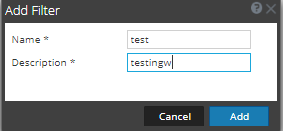
- Click + under Filter Rules Section to enter Rule Description and Rule Conditions as below sample.

- Then Apply this Filter Configuration for Specific Collection Type by switching From Filter to Config Tab from dropdown. In This Sample Syslog UDP Config used this Event Filter.

This Configuration Stops logging from 10.1.1.1 IP addresses.
Resolution
These steps outline the usage of complex regex for dropping event from a range of IP addresses.Sample regex:

Above regex stops logs from Source IP range 10.1.1.100-10.1.1.199.
More details on IP Regex usage elaborated in Interpreting Regex for IP range
Product Details
RSA Product Set: NetWitness Logs & NetworkRSA Product/Service Type: Core Appliance, Collector
RSA Version/Condition: 10.6.X,11.X
Platform: CentOS
O/S Version: 6,7
Summary
This article outlines the usage of regex feature for IP address in Event Filter configuration of Log Collector.
Approval Reviewer Queue
RSA NetWitness Suite Approval Queue