.png?width=180&height=32&name=NW%20Logo%20(2).png)
Issue
While configuring Custom feed from remote https connection, Clicking the Verify button in GUI throws "unable to access the file" and SA logs show SSL errors as below.
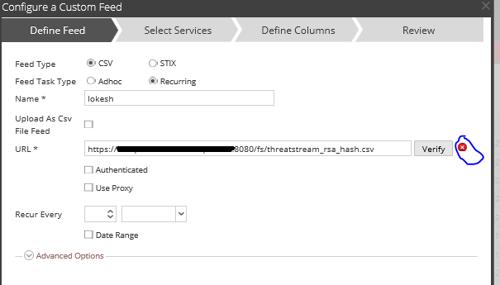
/var/lib/netwitness/uax/logs/sa.log:
Jul 8 11:12:40 sa-chn jetty.sh: 2019-07-08 11:12:40,450 [qtp575593575-61699] ERROR com.rsa.smc.sa.core.service.DefaultHttpClientService - https://Remotehost:8080/fs/threatstream_rsa_hash.csv
Jul 8 11:12:40 sa-chn jetty.sh: javax.net.ssl.SSLHandshakeException: sun.security.validator.ValidatorException: PKIX path building failed: sun.security.provider.certpath.SunCertPathBuilderException: unable to find valid certification path to requested target
Jul 8 11:12:40 sa-chn jetty.sh: at sun.security.ssl.Alerts.getSSLException(Alerts.java:192)
Jul 8 11:12:40 sa-chn jetty.sh: at sun.security.ssl.SSLSocketImpl.fatal(SSLSocketImpl.java:1959)
Jul 8 11:12:40 sa-chn jetty.sh: at sun.security.ssl.Handshaker.fatalSE(Handshaker.java:328)
Jul 8 11:12:40 sa-chn jetty.sh: at sun.security.ssl.Handshaker.fatalSE(Handshaker.java:322)
Jul 8 11:12:40 sa-chn jetty.sh: at sun.security.ssl.ClientHandshaker.serverCertificate(ClientHandshaker.java:1614)
Jul 8 11:12:40 sa-chn jetty.sh: at sun.security.ssl.ClientHandshaker.processMessage(ClientHandshaker.java:216)
Jul 8 11:12:40 sa-chn jetty.sh: 2019-07-08 11:12:40,450 [qtp575593575-61699] ERROR com.rsa.smc.sa.core.service.DefaultHttpClientService - https://Remotehost:8080/fs/threatstream_rsa_hash.csv
Jul 8 11:12:40 sa-chn jetty.sh: javax.net.ssl.SSLHandshakeException: sun.security.validator.ValidatorException: PKIX path building failed: sun.security.provider.certpath.SunCertPathBuilderException: unable to find valid certification path to requested target
Jul 8 11:12:40 sa-chn jetty.sh: at sun.security.ssl.Alerts.getSSLException(Alerts.java:192)
Jul 8 11:12:40 sa-chn jetty.sh: at sun.security.ssl.SSLSocketImpl.fatal(SSLSocketImpl.java:1959)
Jul 8 11:12:40 sa-chn jetty.sh: at sun.security.ssl.Handshaker.fatalSE(Handshaker.java:328)
Jul 8 11:12:40 sa-chn jetty.sh: at sun.security.ssl.Handshaker.fatalSE(Handshaker.java:322)
Jul 8 11:12:40 sa-chn jetty.sh: at sun.security.ssl.ClientHandshaker.serverCertificate(ClientHandshaker.java:1614)
Jul 8 11:12:40 sa-chn jetty.sh: at sun.security.ssl.ClientHandshaker.processMessage(ClientHandshaker.java:216)
Resolution
This issue is due to the Certificate Chain missing in default Netwitness certificates for remote SSL connection.The customer has to work internally to get certificate chain and follow below steps to add to Netwitness key store.
- Please upload the Certificate chain .pem file to Netwitness Head server.
- Run below command to import certificate chain.
keytool -import -file /root/new_crt.pem -alias testing -keystore /usr/lib/jvm/java-1.8.0-openjdk-1.8.0.161-.b14.el7_4.x86_64/jre/lib/security/cacerts
- Restart jetty service using below command. This may cause 5 minutes outage to GUI.
service jetty restart - Then Verify the URL connection for Custom feed.
Product Details
RSA Product Set: NetWitness Logs & NetworkRSA Product/Service Type: Security Analytics Server
RSA Version/Condition: 11.X
Platform: CentOS
O/S Version: 7
Summary
This document helps to have trusted communication with remote https communication from Netwitness Admin server.
Approval Reviewer Queue
RSA NetWitness Suite Approval Queue