.png?width=180&height=32&name=NW%20Logo%20(2).png)
Issue
When upgrading a device or running orchestration-cli-client, the following error can be displayed with some rpms. In this example, it is rsa-nw-sdk:
[2018-11-01T09:55:04+00:00] ERROR: yum_package[rsa-nw-sdk] (rsa-sms-runtime::packages line 11) had an error: Chef::Exceptions::Package:
Installed package rsa-nw-sdk-11.2.0.1-9473.5.19f370a46.el7 is newer than candidate package rsa-nw-sdk-11.2.0.0-9464.5.18083569c.el7
This message can appear under orchestration-cli-client --update-admin output or inside of the /var/log/netwitness/config-managment/chef-solo.log file on the host undergoing orchestration or an upgrade.
Installed package rsa-nw-sdk-11.2.0.1-9473.5.19f370a46.el7 is newer than candidate package rsa-nw-sdk-11.2.0.0-9464.5.18083569c.el7
Cause
This message can occur because of a number of reasons. Here is a list of common ones:- Hotfix rpms are installed
- nwsetup-tui after a service was installed on a device
- An upgrade to the wrong version was specified
...
"rsa-sms-runtime" : {
"cookbook_name" : "rsa-sms-runtime",
"service_names" : [ ],
"family" : "carlos",
"description" : "SMS Runtime",
"orchestration_managed" : false,
"after" : [ "nw-pki" ],
"depends" : [ ],
"categories" : [ ],
"service_accounts" : [ ],
"packages" : [ {
"name" : "rsa-nw-sdk",
"version" : "11.2.0.1-9473.5.19f370a46.el7"
}, {
"name" : "rsa-protobufs-rt",
"version" : "1.9.0.0-798.5.f1c60a21f.el7.centos"
}, {
"name" : "rsa-sms-runtime-rt",
"version" : "11.2.0.1-4365.5.cd4a07664.el7.centos"
} ],
"firewall_rules" : [ ],
"filesystem" : {
"symlinks" : [ {
"path" : "/usr/lib64/libjvm.so",
"target" : "/etc/alternatives/jre/lib/amd64/server/libjvm.so"
} ]
},
...
"rsa-sms-runtime" : {
"cookbook_name" : "rsa-sms-runtime",
"service_names" : [ ],
"family" : "carlos",
"description" : "SMS Runtime",
"orchestration_managed" : false,
"after" : [ "nw-pki" ],
"depends" : [ ],
"categories" : [ ],
"service_accounts" : [ ],
"packages" : [ {
"name" : "rsa-nw-sdk",
"version" : "11.2.0.1-9473.5.19f370a46.el7"
}, {
"name" : "rsa-protobufs-rt",
"version" : "1.9.0.0-798.5.f1c60a21f.el7.centos"
}, {
"name" : "rsa-sms-runtime-rt",
"version" : "11.2.0.1-4365.5.cd4a07664.el7.centos"
} ],
"firewall_rules" : [ ],
"filesystem" : {
"symlinks" : [ {
"path" : "/usr/lib64/libjvm.so",
"target" : "/etc/alternatives/jre/lib/amd64/server/libjvm.so"
} ]
},
...
This is us telling Chef to install rpm rsa-nw-sdk that is version "11.2.0.1-9473.5.19f370a46.el7" if it is not there.
Workaround
Once we established which file you need to modify for your situation, the next part is simple. Find the line(s) that your problematic rpm is mentioned and remove the version check for it. If you are using vi, you can type '/' followed by your rpm to allow for a search of the file. For some is, this happens multiple times and all will need to be corrected. So, going back to my example, to bypass the error, I would do the following:
...
"name" : "rsa-nw-sdk" ,
"version" : "11.2.0.1-9473.5.19f370a46.el7"
}, {
...
"name" : "rsa-nw-sdk" ,
"version" : "11.2.0.1-9473.5.19f370a46.el7"
}, {
...
Becomes:
...
"name" : "rsa-nw-sdk"
}, {
...
"name" : "rsa-nw-sdk"
}, {
...
Pay special attention to the fact that I removed the comma from above in this example. We want to make sure this is valid json. This makes chef only check to make sure the rpm is installed, regardless of version.
If you create a situation where the json is invalid, you will know this is the case when you click to install a service and this message is displayed.
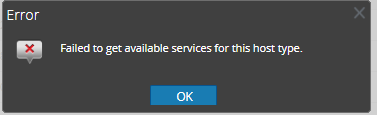
Now, you may continue to try and install/upgrade a device as needed. Regretfully, this may be a trial and error situation where you may have to do this multiple times to accomplish your goal.
Special Note: If you make this change and find that no new chef logs are being generated on an upgrade or a install a service, then you may want to review this KB article as well.
Resolution
Depending on the situation, you may be able to bypass this error by modifying the component descriptor as mentioned above. Please pay attention to the following as it may determine which file you need to modifyIf you encounter this error while running the nwsetup-tui, then you must modify the component descriptor on the component host that you are running the is-tui .
If your device was first installed on a 11.1, for example, then this is probably the file you want to modify:
/etc/netwitness/component-descriptor/descriptor/11.1.0.0/nw-component-descriptor.json.
Be sure to backup before you modify.
cp /etc/netwitness/component-descriptor/descriptor/11.1.0.0/nw-component-descriptor.json /root/nw-component-descriptor.json
vi /etc/netwitness/component-descriptor/descriptor/11.1.0.0/nw-component-descriptor.json
In this situation, you are likely to see the salt-minion or iptables rpms are the ones being complained about.
vi /etc/netwitness/component-descriptor/descriptor/11.1.0.0/nw-component-descriptor.json
If you encounter this error while installing a service or upgrading a device, then you must modify the component descriptor on the NetWitness Admin Server.
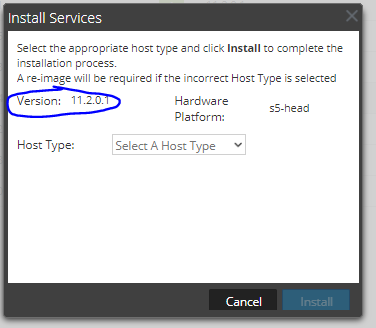
If you are installing a service or upgrading a device, the component descriptor you want to modify is typically the one you are trying to go to. When you are installing a service on a device that has already existed in the environment before, it may have patch rpms from 11.1.0.1 or 11.2.0.1 or so forth. This is where we see this situation a lot because while the device is technically 11.2.0.1 we are installing it as if it's 11.2.0.0. When we install, you will see in the GUI what version it is looking to install. This helps us designate which component descriptor we need to modify on the Admin Server.
Notes
If this KB article did not solve your problem, please open a case with RSA Technical Support and quote this KB for further assistance.
Product Details
RSA Product Set: RSA Netwitness Logs and NetworkRSA Product/Service Type: RSA Netwitness Host
RSA Version/Condition: 11.X
Platform: CentOS
O/S Version: EL7
Summary
This article will how you can modify the component descriptor to bypass the Chef during Orchestration processes.
Approval Reviewer Queue
RSA NetWitness Suite Approval Queue