.png?width=180&height=32&name=NW%20Logo%20(2).png)
Issue
When installing Power Vault storage with a NetWitness Series 6(S6) Hybrid (Dell R740), the issues below may be encountered:- The NW system will not recognize the PowerVault storage in nwraidutil.pl.
- No light on PERC RAID Controller card.
Cause
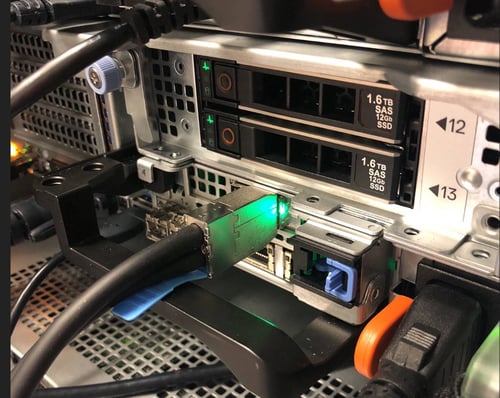
- On the Series 6 Hybrid appliance, the PERC card is inverted compared to the Core appliances.
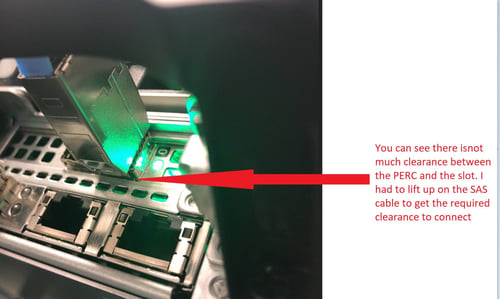
- Since the PERC cards are located just above the appliance handle, plugging in the SAS cable can be difficult.
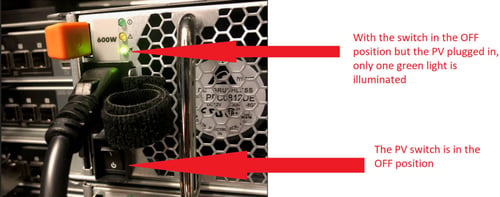
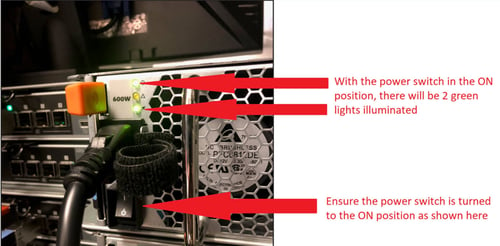
- With PowerVault storage, there is a rocker switch on each power supply that needs to be turned on after plugging it in. If the PowerVault is plugged in, but the switch is OFF, there will be no link light on the PERC card.
Resolution
- Make sure when the SAS cable gets plugged in, the blue tab on the cable will face downward as shown in the picture below.
- When connecting the SAS cable, lift up on the SAS cable to move the PERC card up slightly. This is to create some clearance between the PERC card and appliance slot. This will help to get the cable to seat correctly, as shown in the picture below.
- Make sure to turn the rocker switch ON. See the picture below for location of the switch and the behavior between ON and OFF positions.
Product Details
RSA Product Set: Security Analytics, NetWitness Logs & NetworkRSA Product/Servie Type: Security Analytics Hybrid, PowerVault
RSA Version/Condition: 11.1.0.2 or 10.6.6 above
Platform: CentOS
Platform(Other): O/S Version: EL6 /EL7
Approval Reviewer Queue
RSA NetWitness Suite Approval Queue