.png?width=180&height=32&name=NW%20Logo%20(2).png)
Issue
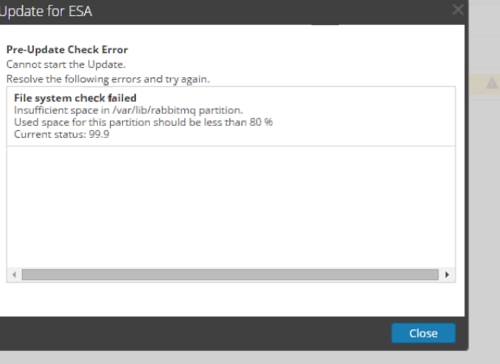
The Updates tab is showing a yellow ! status in the Security Analytics UI.When clicking on the "Updates" tab, the error message below is displayed.
Pre-Update Check Error
Cannot start the Upgrade,
Resolve the following errors and try again.
File system check failed.
Insufficient space in /var/lib/rabbitmq partition.
Used space for this partition should be less than 80%
Cannot start the Upgrade,
Resolve the following errors and try again.
File system check failed.
Insufficient space in /var/lib/rabbitmq partition.
Used space for this partition should be less than 80%
Workaround
Verify there is at least 80% disk space available on the /var/netwitness partition for the device in question from the command line using the df -k command. If there is sufficient space, the error may be safely ignored, and you may proceed with the upgrade using the manual method described in the upgrade documentation.Resolution
This issue will be fixed in a future release of 10.5.x.Refer to the workarounds section of this document to continue with the upgrade.
Product Details
RSA Product Set: Security AnalyticsRSA Product/Service Type: SA ServerSecurity Analytics UI
RSA Version/Condition: 10.5.1.0, 12.x
Platform: CentOS/Alma Linux
O/S Version: 6
Summary
This article describes a situation where the UI automated updates tab incorrectly reports insufficient disk space during the Pre-Update Check.
Approval Reviewer Queue
Technical approval queue