.png?width=180&height=32&name=NW%20Logo%20(2).png)
Issue
During the File collection event source integration, Cache key to connect the event source with the STIG Collector results in the following errors: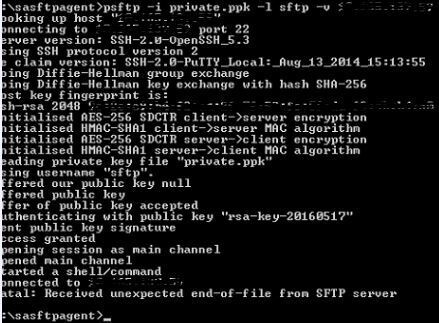
Cause
This error is the result of the expired "sftp" user password in the STIG Collector.This can be verified using the following.
/var/log/secure :
May 18 12:11:46 XXX sshd[4972]: pam_unix(sshd:account): expired password for user sftp (root enforced)
To see the password status for the "sftp" user, run the following command in the STIG collector:
# chage -l sftp
Example:

Resolution
As per STIG compliance, all user passwords need to be renewed every 60 days. During the File collection integration, make sure that the "sftp" user password is not expired.If the "sftp" user passwords need to be changed, use the following steps:
- Log into the STIG collector ssh session as an administrator.
- Run the following command to change the password. Note: Please use https://community.rsa.com/docs/DOC-78925 for information regarding STIG compliant passwords.
# passwd sftp
- Try the Cache key step in the event source with the following command:
# psftp -i private.ppk -l sftp -v <Collector IP>
Product Details
RSA Product Set: Security AnalyticsRSA Product/Service Type: Security Analytics Core Appliance, Security Analytics Log Collector
RSA Version/Condition: 10.4.X, 10.5.X, 10.6.X
Platform: CentOS
O/S Version: 6
Summary
This error is the result of the expired sftp user password in the STIG Collector when integrating the file collection event source.
Approval Reviewer Queue
RSA NetWitness Suite Approval Queue