.png?width=180&height=32&name=NW%20Logo%20(2).png)
Issue
After changing the network setting using the built-in net config script and reboot the OS, the Security Analytics VM hangs and shows the message "bringing up eth0."
Resolution
Follow the steps below to resolve the issue:- Power off the VM.
- When the boot loader starts, press “e” to edit the boot parameters.
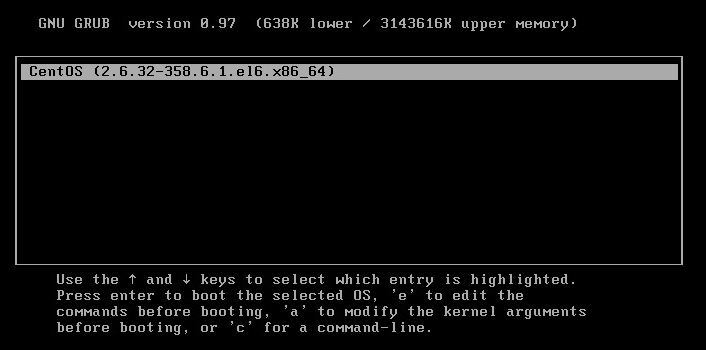
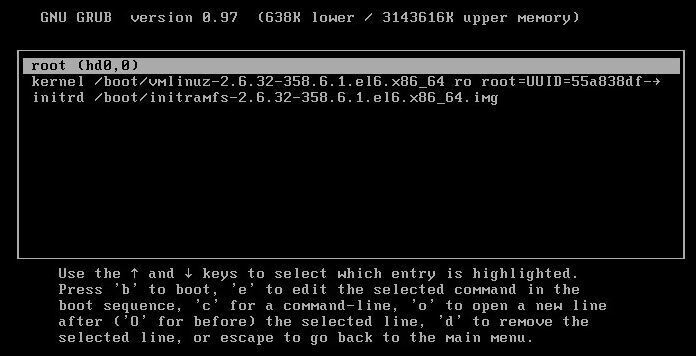
- Three lines are represented, select the second and press “e” to edit the line.


- Add at the end “init=/bin/sh”, press enter and then “b” to start the boot process.


- A Shell should appear shortly after.
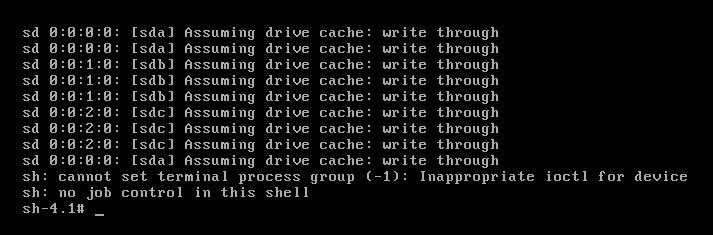
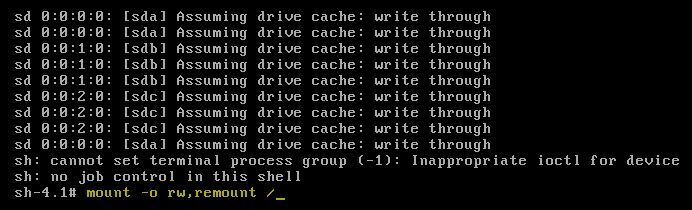
- The filesystem is in read-only mode, so to remount it, enter the command: mount –o rw,remount /
- Get rid of vmware tools by issuing the command: mv /etc/init/vmware-tools.conf /root

- Commit changes on the filesystem with the following command: sync
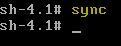
- Power off the from the console. (reboot, shutdown, etc. will not work)
If you are unsure of any of the steps above or experience any issues, contact RSA Support and quote this article number for further assistance.
Notes
After removing the vmware tools, tasks such as "Power Off the virtual machine" on the VM getting started tab are no longer available.This function will have to be done from the vSphere Client by right-clicking the VM -> Power -> Power Off.
Internal Comments
Product Details
RSA Product Set: Security AnalyticsRSA Product/Service Type: SA Virtual Machine (VM)
RSA Version/Condition: All versions
Summary
After changing the network setting using the built-in net config script and reboot the OS, the Security Analytics VM hangs and shows the message bringing up eth0.
Approval Reviewer Queue
Technical approval queue