.png?width=180&height=32&name=NW%20Logo%20(2).png)
Issue
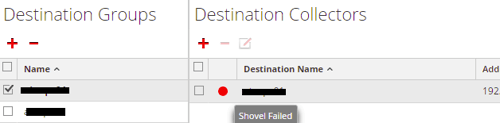
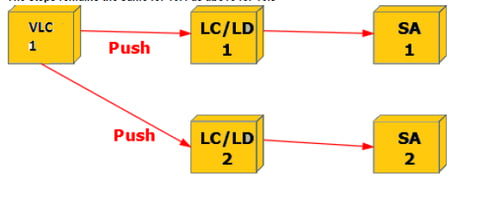
This Article provides steps on how to troubleshoot rabbitMQ push shovel queue if it becomes unavailable on a replication scenario where 2 or more collectors/AIO/SA are set.Please observe the picture below as an example:
Resolution
Make sure first puppet certificates are properly set and puppet agent -t runs successfully by checking the steps below:
- Make sure all versions are up to date with puppet running (i.e. VLC, LC2/LC1, SA1(or AIO1),SA2 (or AIO2)
- Locate the truststore.pem file on both SA's(SA1 and SA2) using path "/etc/puppet/modules/rabbitmq/files" on your ssh session
- Merge the contents of truststore.pem of both SA's and create and replace single truststore.pem on both SA's
- Run puppet agent on all the connected components All puppet runs must complete successfully without any errors,this is necessary else the connection won't work. Complete this step in 30mnts Note : (Execute command on LC2/LC1,SA1,SA2 and VLC ): puppet agent –t
- We need to obtain the UUID for both VLC and LC affected by the issue to exchange the UUIDs in the form of rabbitmq user names and create "logcollection" and "/ " vhosts:
- Run node_id.py to obtain uuid, from the VLC first
/etc/puppet/scripts/node_id.py
7. From the AIO/LC affected by the issue ran the following commands using the UUID obtained from the VLC
/etc/puppet/scripts/addUser.sh 1daddfe2-a0da-4577-897e-3128364e6bbd logcollection
/etc/puppet/scripts/addUser.sh 1daddfe2-a0da-4577-897e-3128364e6bbd /
8. Repeat the same steps obtaining UUID from LC and adding it to LC.
Internal Comments
Archive it
Summary
This article explains how to troubleshoot this issue if push shovel queue becomes unavailable on a VLC/LC replication scenario.
Approval Reviewer Queue
Technical approval queue