Skip to content
  • There are no suggestions because the search field is empty.

Rule Library Panel

Rule Library PanelRule Library Panel

The Rule Library panel allows you to manage rules.

What do you want to do?What do you want to do?


Related TopicsRelated Topics

Quick LookQuick Look

To access this view, go to netwitness_configureicon_24x21.png (Configure) > ESA Rules. The Rules tab is displayed and the Rule Library panel is on the right.

The following figure shows the Rule Library panel.

netwitness_rulelibpnl_672x376.png

The Rule Library panel includes the following components:

  • Rule Library toolbar
  • Rule Library list

Rule Library ToolbarRule Library Toolbar

The Rule Library toolbar allows you to add, delete, edit, duplicate, filter, export, and import ESA rules. The following figure shows the icons for these actions.

netwitness_rulelibtb_672x32.png

Rule Library ListRule Library List

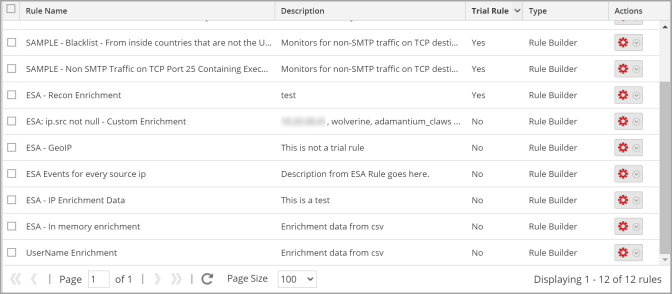
The following figure shows the Rule Library list.
netwitness_ruleliblist_672x294.png

The Rule Library list shows all of the ESA rules. The following table lists the columns in the Rule Library list and their description.

  • Column: Rule Name
  • Description: Purpose of the ESA rule.

  • Column: Description
  • Description: Summary of what the ESA rule detects.

  • Column: Trial Rule
  • Description: Deployment mode to see if the rule runs efficiently.

  • Column: Type
  • Description: The type of rule. For more information, see ESA Rule Types.

  • Column: Actions
    (netwitness_ic-actns.png)
  • Description: Menu to delete, edit, duplicate, or export the selected rule.

  • Column: Severity
  • Description: Threat level of alert triggered by the rule.

  • Column: Email
  • Description: Indicates whether an alert notification for the rule is sent by email. This column is not visible by default.

  • Column: SNMP
  • Description: Indicates whether an alert notification for the rule is sent using SNMP. This column is not visible by default. (ESA SNMP notifications are not supported in NetWitness version 11.3 and later.)

  • Column: Syslog
  • Description: Indicates whether an alert notification for the rule is sent using Syslog. This column is not visible by default.

  • Column: Script
  • Description: Indicates whether an alert notification for the rule executes a script. This column is not visible by default.

  • Column: Last Modified
  • Description: The date and time when the ESA rule was last modified. This column is not visible by default.

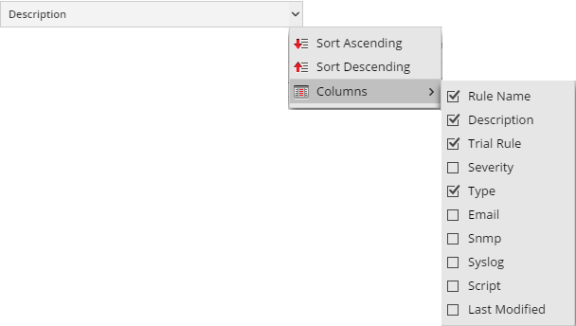
To display columns which aren't visible by default, hover over the title of a column and click the v on the right. This opens a drop-down menu in which you can sort the contents of the column or choose which columns you want to see in the Rule Library list.
netwitness_esacolumns_576x326.png